The Internet has transformed society in so many ways, and that’s bound to continue. The aim of our Big Tent events is to bring together people with diverse views to debate some of the hot-button issues that transformation raises.
This week we hosted our first Big Tent event stateside at the Computer History Museum in Mountain View, Calif. The theme was Digital Citizenship, and over the course of the day we discussed child safety online, the most effective ways to incorporate technology with education and what governments and civil society can do to maintain a responsible and innovative web.
The policymakers, commentators and industry members who attended heard from a variety of speakers, from child prodigy and literacy evangelist Adora Svitak to filmmaker and Webby Awards founder Tiffany Shlain. Wendy Kopp, the CEO and founder of Teach for America, gave a keynote about the need to integrate technology into education thoughtfully, not as a panacea, but rather within a greater context that supports critical thinking and other crucial curriculum goals. In a fireside chat with David Drummond, Jennifer Pahlka, the founder and executive director of Code for America (which takes the idea of skilled service from Teach for America and applies it to programmers) laid out her vision for a growing corps of young coder volunteers with an “agile, maker-and-doer mentality” that can help local governments better serve their citizens, and help citizens better participate in their democracy. “Instead of a chorus of voices,” she said, “I’d like to see a chorus of hands.”
We also launched a new Big Tent YouTube channel with a collection of content from past Big Tents and information about upcoming events around the world. Visit the channel to watch speaker videos, participate in the debate via the comments, get more information on the presenters and see how different communities approach many of the same issues. Stay tuned for future Big Tents, both here and abroad.
Jumat, 30 Maret 2012

Kamis, 29 Maret 2012
Learning independence with Google Search features
Searches can become stories. Some are inspiring, some change the way we see the world and some just put a smile on our face. This is a story of how people can use Google to do something extraordinary. If you have a story, share it. - Ed.
We all have memories of the great teachers who shaped our childhood. They found ways to make the lightbulb go off in our heads, instilled in us a passion for learning and helped us realize our potential. The very best teachers were creative with the tools at their disposal, whether it was teaching the fundamentals of addition with Cheerios or the properties of carbon dioxide with baking soda and vinegar. As the Internet has developed, so too have the resources available for teachers to educate their students.
One teacher who has taken advantage of the web as an educational tool is Cheryl Oakes, a resource room teacher in Wells, Maine. She’s also been able to tailor the vast resources available on the web to each student’s ability. This approach has proven invaluable for Cheryl’s students, in particular 16-year-old Morgan, whose learning disability makes it daunting to sort through search results to find those webpages that she can comfortably read. Cheryl taught Morgan how to use the Search by Reading Level feature on Google Search, which enables Morgan to focus only on those results that are most understandable to her. To address the difficulty Morgan faces with typing, Cheryl introduced her to Voice Search, so Morgan can speak her queries into the computer. Morgan is succeeding in high school, and just registered to take her first college course this summer.
There’s a practically limitless amount of information available on the web, and with search features, you can find the content that is most meaningful for you. For more information, visit google.com/insidesearch/features.html.
We all have memories of the great teachers who shaped our childhood. They found ways to make the lightbulb go off in our heads, instilled in us a passion for learning and helped us realize our potential. The very best teachers were creative with the tools at their disposal, whether it was teaching the fundamentals of addition with Cheerios or the properties of carbon dioxide with baking soda and vinegar. As the Internet has developed, so too have the resources available for teachers to educate their students.
One teacher who has taken advantage of the web as an educational tool is Cheryl Oakes, a resource room teacher in Wells, Maine. She’s also been able to tailor the vast resources available on the web to each student’s ability. This approach has proven invaluable for Cheryl’s students, in particular 16-year-old Morgan, whose learning disability makes it daunting to sort through search results to find those webpages that she can comfortably read. Cheryl taught Morgan how to use the Search by Reading Level feature on Google Search, which enables Morgan to focus only on those results that are most understandable to her. To address the difficulty Morgan faces with typing, Cheryl introduced her to Voice Search, so Morgan can speak her queries into the computer. Morgan is succeeding in high school, and just registered to take her first college course this summer.
There’s a practically limitless amount of information available on the web, and with search features, you can find the content that is most meaningful for you. For more information, visit google.com/insidesearch/features.html.
Let’s fill London with startups...
London has become one of the world's great digital capitals. The Internet accounts for eight percent of the U.K. economy and has become, in these days of tough public finances, a welcome engine of economic growth.
We believe there is even more potential for entrepreneurs to energize the Internet economy in the U.K., and to help spur growth, today we’re opening Campus London , a seven story facility in the east London neighborhood known as Tech City. Google began as a startup in a garage. We want to empower the next generation of entrepreneurs to be successful by building and supporting a vibrant startup community. Our goal with Campus is to catalyze the startup ecosystem and build Britain's single largest community of startups under one roof.
The U.K.’s Chancellor of the Exchequer, the Rt. Hon. George Osborne MP, launched Campus at this morning's official opening. The Chancellor toured the building, meeting some of the entrepreneurs currently making their home in Campus and learning more about their innovations, ranging from fashion trendsetting websites to personalized London leisure guides. He then flipped the switch on a commemorative graffiti plaque.
Campus is a collaboration between Google and partners Central Working, Tech Hub, Seedcamp and Springboard. It will provide startups with workspace in an energizing environment and will also host daily events for and with the community. We will run a regular speaker series, alongside lectures and programing, as well as provide mentorship and training from local Google teams.
Visitors will have access to a cafe and co-working space, complete with high speed wifi. We welcome members of the startup community: entrepreneurs, investors, developers, designers, lawyers, accountants, etc. and hope that this informal, highly concentrated space will lead to chance meetings and interactions that will generate the ideas and partnerships that will drive new, innovative businesses.
The buzz around Campus from within the startup community has meant that today, on day one, Campus is already at 90% capacity, with more than 100 people on site and an additional 4,500 who have signed up online to visit.
We are looking forward to getting to know the community. East London is emerging as a world-leading entrepreneurial hub, and we’re excited to be a part of it. Take a photo tour of Campus here, and if you’d like to learn more, visit us at www.campuslondon.com.
Let’s fill this town with startups!
(Cross-posted from the European Public Policy blog)
We believe there is even more potential for entrepreneurs to energize the Internet economy in the U.K., and to help spur growth, today we’re opening Campus London , a seven story facility in the east London neighborhood known as Tech City. Google began as a startup in a garage. We want to empower the next generation of entrepreneurs to be successful by building and supporting a vibrant startup community. Our goal with Campus is to catalyze the startup ecosystem and build Britain's single largest community of startups under one roof.
The U.K.’s Chancellor of the Exchequer, the Rt. Hon. George Osborne MP, launched Campus at this morning's official opening. The Chancellor toured the building, meeting some of the entrepreneurs currently making their home in Campus and learning more about their innovations, ranging from fashion trendsetting websites to personalized London leisure guides. He then flipped the switch on a commemorative graffiti plaque.
Campus is a collaboration between Google and partners Central Working, Tech Hub, Seedcamp and Springboard. It will provide startups with workspace in an energizing environment and will also host daily events for and with the community. We will run a regular speaker series, alongside lectures and programing, as well as provide mentorship and training from local Google teams.
Visitors will have access to a cafe and co-working space, complete with high speed wifi. We welcome members of the startup community: entrepreneurs, investors, developers, designers, lawyers, accountants, etc. and hope that this informal, highly concentrated space will lead to chance meetings and interactions that will generate the ideas and partnerships that will drive new, innovative businesses.
The buzz around Campus from within the startup community has meant that today, on day one, Campus is already at 90% capacity, with more than 100 people on site and an additional 4,500 who have signed up online to visit.
We are looking forward to getting to know the community. East London is emerging as a world-leading entrepreneurial hub, and we’re excited to be a part of it. Take a photo tour of Campus here, and if you’d like to learn more, visit us at www.campuslondon.com.
Let’s fill this town with startups!
(Cross-posted from the European Public Policy blog)
Rabu, 28 Maret 2012
Crossing the 50 billion km mark and giving Google Maps for Android a fresh look
Every day, millions of people turn to Google Maps for Android for free, voice-guided GPS navigation to guide them to their destination. So far, Navigation on Google Maps for Android has provided 50 billion kilometers of turn-by-turn directions, the equivalent of 130,000 trips to the moon, 334 trips to the sun, 10 trips to Neptune or 0.005 light years! When getting to your destination matters most, Google Maps for Android will get you there:
A new look for Navigation on Android 4.0+ phones
In today’s release of Google Maps 6.5 for Android we’ve redesigned the Navigation home screen in Android 4.0+ to make it easier to enter a new destination or select from recent and favorite locations by swiping left or right.

Left: New Navigation home screen Right: Navigation in Google Maps for Android
Crisper, faster maps for high pixel density devices
If your device has a high pixel density screen, such as those on Galaxy Nexus, Galaxy S II, Droid Razr and others, you’ll now get higher resolution map tiles that take better advantage of the pixels-per-inch on your screen. The result is a crisper, less cluttered map that is easier to read:
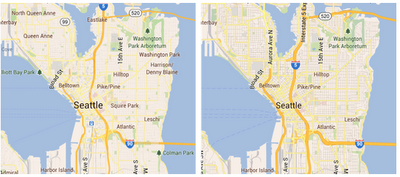
Left: Previous style Right:New style in Google Maps 6.5 for Android
Compare our new map on the right to the previous map on the left. The road network is easier to see, less obstructed by labels, and has more color contrast. At more zoomed-in levels, you’ll notice a more controlled amount of maps labels to avoid cluttering the map and blocking out street names. The new style also helps maps react faster to panning, zooming and twisting.
You'll start seeing the new style as you navigate around new areas on the map; however, you can see these changes immediately by clearing your cache from the Maps settings.
Pick your preferred public transit mode and route option
Google Maps 6.5 for Android now lets you choose to prioritize a particular transit mode (such as the bus or subway) and route option (like taking the recommended route, one with fewer transfers or one with less walking). Whether you just need to get somewhere as fast as possible, or you want to avoid the risk of a missed connection or you prefer not to tire your legs, you can get the transit directions that best suit you. Transit directions and schedules are available for 475 cities around the world.

To start using Google Maps 6.5 for Android, download the update from Google Play. Learn more about how to use other great features of Google Maps for Android on the redesigned Google Maps YouTube channel that has 12 new videos available today.
(Cross-posted on the Lat Long blog)
A new look for Navigation on Android 4.0+ phones
In today’s release of Google Maps 6.5 for Android we’ve redesigned the Navigation home screen in Android 4.0+ to make it easier to enter a new destination or select from recent and favorite locations by swiping left or right.

Crisper, faster maps for high pixel density devices
If your device has a high pixel density screen, such as those on Galaxy Nexus, Galaxy S II, Droid Razr and others, you’ll now get higher resolution map tiles that take better advantage of the pixels-per-inch on your screen. The result is a crisper, less cluttered map that is easier to read:

Compare our new map on the right to the previous map on the left. The road network is easier to see, less obstructed by labels, and has more color contrast. At more zoomed-in levels, you’ll notice a more controlled amount of maps labels to avoid cluttering the map and blocking out street names. The new style also helps maps react faster to panning, zooming and twisting.
You'll start seeing the new style as you navigate around new areas on the map; however, you can see these changes immediately by clearing your cache from the Maps settings.
Pick your preferred public transit mode and route option
Google Maps 6.5 for Android now lets you choose to prioritize a particular transit mode (such as the bus or subway) and route option (like taking the recommended route, one with fewer transfers or one with less walking). Whether you just need to get somewhere as fast as possible, or you want to avoid the risk of a missed connection or you prefer not to tire your legs, you can get the transit directions that best suit you. Transit directions and schedules are available for 475 cities around the world.

To start using Google Maps 6.5 for Android, download the update from Google Play. Learn more about how to use other great features of Google Maps for Android on the redesigned Google Maps YouTube channel that has 12 new videos available today.
(Cross-posted on the Lat Long blog)
Giving you more insight into your Google Account activity
Every day we aim to make technology so simple and intuitive that you stop thinking about it—we want Google to work so well, it just blends into your life. But sometimes it’s helpful to step back and take stock of what you’re doing online.
Today we’re introducing Account Activity, a new feature in your Google Account. If you sign up, each month we’ll send you a link to a password-protected report with insights into your signed-in use of Google services.
For example, my most recent Account Activity report told me that I sent 5 percent more email than the previous month and received 3 percent more. An Italian hotel was my top Gmail contact for the month. I conducted 12 percent more Google searches than in the previous month, and my top queries reflected the vacation I was planning: [rome] and [hotel].

Knowing more about your own account activity also can help you take steps to protect your Google Account. For example, if you notice sign-ins from countries where you haven’t been or devices you’ve never owned, you can change your password immediately and sign up for the extra level of security provided by 2-step verification.
Account Activity is a complement to other tools like the Google Dashboard, which shows you what information is stored in your Google Account, and the Ads Preferences Manager, which lets you control the way Google tailors ads to your interests.
Give Account Activity a try, and tell us what you think by clicking on the “Send feedback” button in the lower right corner of your report. Over the next few months, we plan to incorporate more Google services. Meanwhile, we hope this feature helps you better understand and manage your information on Google.
Update March 30: Added information about related tools.
Today we’re introducing Account Activity, a new feature in your Google Account. If you sign up, each month we’ll send you a link to a password-protected report with insights into your signed-in use of Google services.
For example, my most recent Account Activity report told me that I sent 5 percent more email than the previous month and received 3 percent more. An Italian hotel was my top Gmail contact for the month. I conducted 12 percent more Google searches than in the previous month, and my top queries reflected the vacation I was planning: [rome] and [hotel].
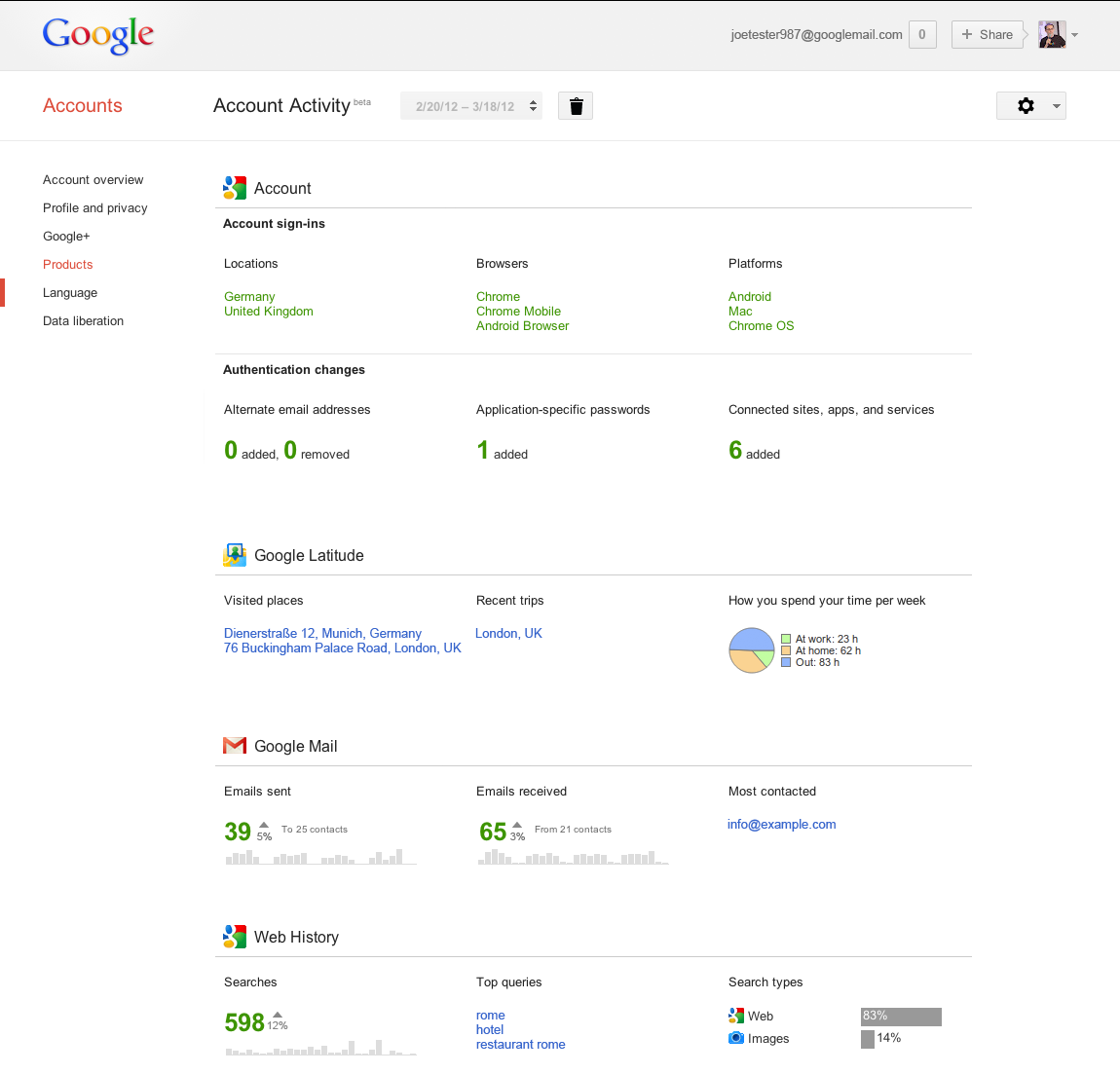
Click the image for a larger version
Knowing more about your own account activity also can help you take steps to protect your Google Account. For example, if you notice sign-ins from countries where you haven’t been or devices you’ve never owned, you can change your password immediately and sign up for the extra level of security provided by 2-step verification.
Account Activity is a complement to other tools like the Google Dashboard, which shows you what information is stored in your Google Account, and the Ads Preferences Manager, which lets you control the way Google tailors ads to your interests.
Give Account Activity a try, and tell us what you think by clicking on the “Send feedback” button in the lower right corner of your report. Over the next few months, we plan to incorporate more Google services. Meanwhile, we hope this feature helps you better understand and manage your information on Google.
Update March 30: Added information about related tools.
Selasa, 27 Maret 2012
Take a train through the Swiss Alps with Street View
For the first time, you can ride a train on Street View. Through a partnership with UNESCO and Rhaetian Railways, we captured 75.8 miles/122 km of the famous UNESCO World Heritage Albula/Bernina railway line with Street View cameras. Starting today, in addition to accessing the imagery from directly within Google Maps, you can also find the collection in our new gallery.
Like our trip to the Amazon, this Swiss mountain journey also began last year, when we attached the Street View trike to the wagon of a Rhaetian Railway train. From the very front of the train, the trike took 360-degree images along the expansive track.
You can watch the video of how we did it here, and for more Street View collections around the world, visit our updated Street View gallery.
Enjoy the ride!
(Cross-posted on the Lat Long blog)
Like our trip to the Amazon, this Swiss mountain journey also began last year, when we attached the Street View trike to the wagon of a Rhaetian Railway train. From the very front of the train, the trike took 360-degree images along the expansive track.
You can watch the video of how we did it here, and for more Street View collections around the world, visit our updated Street View gallery.
Enjoy the ride!
(Cross-posted on the Lat Long blog)
Explore Mandela’s archives online
Last year we announced a $1.25 million grant to the Nelson Mandela Centre of Memory to help preserve and digitize thousands of archival documents, photographs and videos about Nelson Mandela. Based in Johannesburg, South Africa, the Nelson Mandela Centre of Memory (NMCM) is committed to documenting the life and times of one of the world's greatest statesmen and spreading his story to promote social justice throughout the world.
Today, the Mandela archive has become a reality. Along with historians, educationalists, researchers, activists and many others around the world, you can access a wealth of information and knowledge about the life and legacy of this extraordinary African leader. The new online multimedia archive includes Mandela’s correspondence with family, comrades and friends, diaries written during his 27 years of imprisonment, and notes he made while leading the negotiations that ended apartheid in South Africa. The archive will also include the earliest-known photo of Mr. Mandela and never-before seen drafts of Mr. Mandela's manuscripts for the sequel to his autobiography Long Walk to Freedom.

We’ve worked closely with the NMCM to create an interactive online experience which we hope will inspire you as much as us. You can search and browse the archives to explore different parts of Mandela’s life and work in depth: Early Life, Prison Years, Presidential Years, Retirement, Books for Mandela, Young People and My Moments with a Legend.
For example, you might be interested in Nelson Mandela’s personal memories of the time he was incarcerated and click into the Prison Years exhibit. You can immediately see a curated set of materials threaded together into a broader narrative. These include handwritten notes on his desk calendars, which show, for example, that he met President F.W. De Klerk for the first time on December 13, 1989 for two and a half hours in prison; the Warrants of Committal issued by the Supreme Court which sent him to prison; the earliest known photo of Nelson Mandela’s prison cell on Robben Island circa 1971; and a personal letter written from prison in 1963 to his daughters, Zeni and Zindzi, after their mother was arrested, complete with transcript.

From there, you might want to see all the letters held by the archive, and click “See more” in the letters category, where you can discover all personal letters or use the time filter to explore his diaries and calendars written between 1988 and 1998, where you can see that in the last page of the last diary, he met with President Yoweri Kaguta Museveni of Uganda to exchange ideas about the situation in northern Uganda. If you were a researcher, you can search through various fragments of Madiba’s memory that relate to Ahmed Kathrada, his long-time comrade, politician and anti-apartheid activist, where you can find photos, videos, manuscripts and letters that relate to him.
Finally, by clicking into the exhibit, My Moments with a Legend, you can go beyond Madiba’s personal materials to get a diverse perspective through photos, videos and stories, via the memories of people like Archbishop Desmond Tutu, F.W. De Klerk and Nomfundo Walaza, a community worker.

The Nelson Mandela Digital Archive project is an initiative by the Nelson Mandela Centre of Memory and the Google Cultural Institute, which helps to preserve and promote our diverse cultural and historical heritage. Some of our other initiatives include the Art Project, digitizing the Dead Sea Scrolls and bringing the Yad Vashem Holocaust materials online.
You can start exploring the Nelson Mandela archive right now at archive.nelsonmandela.org. We hope you’ll be inspired by this influential leader—the face of South Africa’s transition to democracy.
Today, the Mandela archive has become a reality. Along with historians, educationalists, researchers, activists and many others around the world, you can access a wealth of information and knowledge about the life and legacy of this extraordinary African leader. The new online multimedia archive includes Mandela’s correspondence with family, comrades and friends, diaries written during his 27 years of imprisonment, and notes he made while leading the negotiations that ended apartheid in South Africa. The archive will also include the earliest-known photo of Mr. Mandela and never-before seen drafts of Mr. Mandela's manuscripts for the sequel to his autobiography Long Walk to Freedom.

We’ve worked closely with the NMCM to create an interactive online experience which we hope will inspire you as much as us. You can search and browse the archives to explore different parts of Mandela’s life and work in depth: Early Life, Prison Years, Presidential Years, Retirement, Books for Mandela, Young People and My Moments with a Legend.
For example, you might be interested in Nelson Mandela’s personal memories of the time he was incarcerated and click into the Prison Years exhibit. You can immediately see a curated set of materials threaded together into a broader narrative. These include handwritten notes on his desk calendars, which show, for example, that he met President F.W. De Klerk for the first time on December 13, 1989 for two and a half hours in prison; the Warrants of Committal issued by the Supreme Court which sent him to prison; the earliest known photo of Nelson Mandela’s prison cell on Robben Island circa 1971; and a personal letter written from prison in 1963 to his daughters, Zeni and Zindzi, after their mother was arrested, complete with transcript.

From there, you might want to see all the letters held by the archive, and click “See more” in the letters category, where you can discover all personal letters or use the time filter to explore his diaries and calendars written between 1988 and 1998, where you can see that in the last page of the last diary, he met with President Yoweri Kaguta Museveni of Uganda to exchange ideas about the situation in northern Uganda. If you were a researcher, you can search through various fragments of Madiba’s memory that relate to Ahmed Kathrada, his long-time comrade, politician and anti-apartheid activist, where you can find photos, videos, manuscripts and letters that relate to him.
Finally, by clicking into the exhibit, My Moments with a Legend, you can go beyond Madiba’s personal materials to get a diverse perspective through photos, videos and stories, via the memories of people like Archbishop Desmond Tutu, F.W. De Klerk and Nomfundo Walaza, a community worker.

The Nelson Mandela Digital Archive project is an initiative by the Nelson Mandela Centre of Memory and the Google Cultural Institute, which helps to preserve and promote our diverse cultural and historical heritage. Some of our other initiatives include the Art Project, digitizing the Dead Sea Scrolls and bringing the Yad Vashem Holocaust materials online.
You can start exploring the Nelson Mandela archive right now at archive.nelsonmandela.org. We hope you’ll be inspired by this influential leader—the face of South Africa’s transition to democracy.
Langganan:
Postingan (Atom)