This morning we kicked off day 2 at I/O to talk about the open web—one of the most amazing platforms we have seen. To put things in perspective, today there are more than 2.3 billion users on the web—a staggering number, but it only represents one-third of the world’s population. There’s still a lot of opportunity for growth.
Chrome, which we built from the ground up as a browser for the modern web, has seen tremendous adoption. Thanks to many of you, Chrome has nearly doubled since last year’s I/O—from 160 million to 310 million active users around the world. As more and more of you live your lives online, we want to to help make it easy for you to live in the cloud...seamlessly.
A better web to your web
One of the most exciting shifts is the explosion of the mobile web. When Chrome first launched, many people were tethered to a single computer. Today most people use multiple computers, smartphones and tablets. With that trend in mind, our goal is to offer you a consistent, personalized web experience across all devices. In February, we released Chrome for Android, which exited beta this week and is the standard browser on Nexus 7, a powerful new tablet.
Starting today, Chrome is also available for your iPhone and iPad. That means you can enjoy the same speedy and simple Chrome experience across your devices. Also, by signing in to Chrome, you can easily move from your desktop, laptop, smartphone and tablet and have all of your stuff with you.
Living in the cloud
A modern browser is just one ingredient of living online seamlessly. We continue to invest in building cloud apps, which many people rely on daily. Gmail, which launched in 2004, has evolved from a simple email service to the primary mode of communication for more than 425 million active users globally. We’ve also built a suite of apps to help users live in the cloud, including Google Documents, Spreadsheets, Calendar and more.
At the hub of this cloud experience is Google Drive—a place where you can create, share, collaborate and keep all your stuff. Ten weeks ago we launched Drive and in 10 weeks, more than 10 million users have signed up. Today we introduced more capabilities, including offline editing for Google documents and a Drive app for your iPhone and iPad. Drive is also seamlessly integrated into Chrome OS. With Drive available across Mac, Windows, Chrome OS, Android and iOS, it’s even easier to get things done in the cloud from anywhere.
Going Google
With the help of Chrome and and the growth of Google apps, people are discovering new ways to get things done faster, connect with others, and access their information no matter what device they’re using. This is what we call “going Google.” And it’s not just individual people. Schools, government institutions and businesses—big and small—are also “going Google.” Sixty-six of the top 100 universities in the U.S., government institutions in 45 out of 50 U.S. states, and a total of 5 million business are using Google Apps to live and work in the cloud.
It’s an exciting time to be living online. To celebrate this ongoing journey, here’s a quick look back at the evolution of Chrome:
None of what we shared onstage at I/O today would be possible without the awe-inspiring work being done by a global community of developers and the continued support of our users. We can’t wait to see what you do next.
Tampilkan postingan dengan label apps. Tampilkan semua postingan
Tampilkan postingan dengan label apps. Tampilkan semua postingan
Kamis, 28 Juni 2012

Senin, 25 Juni 2012
In schools, all you need is web
While students in the northern hemisphere say goodbye to each other and another school year, we’re in sunny San Diego meeting with thousands of educators and administrators at the International Society for Technology in Education (ISTE) conference. While on break from teaching, these folks are here to teach others how they’re bringing innovation into their classrooms—a lot of which centers around the web.
While the web was developed well before today’s students were born, it’s come a long way even since a year ago. Today you can access the web on any device, use the web offline and take advantage of amazing graphics. For example, you can get a powerful graphing calculator on the web today, for free.
It’s been really amazing to see how the web is impacting schools. We’ve heard great real-world stories about Google Apps for Education, but lately we’re hearing more and more about schools extending the functionality of Google Apps with educational apps available on the Chrome Web Store. There are tens of thousands of apps in the Chrome Web Store, and today we’re adding some new ones: ST Math, VoiceThread and Acheive3000.
To give you an idea of what’s possible on the web: Leyden High School District from Illinois is rolling out Chromebooks to their 3,500 students and are using apps like WeVideo, EasyBib, Vernier Labquest2, SlideRocket, Geogebra and Pearson’s OpenClass as part of their 1-to-1 learning initiative.

Chromebooks as a tool for 1-to-1 learning
It’s great to see that many schools are choosing Chromebooks as an effective and affordable 1-to-1 education tool. There are more than 500 districts in the U.S. and Europe actively using Chromebooks, and today we’re pleased to welcome a few more to the community, including Rockingham Country Schools, N.C., Transylvania County Schools, N.C., and Fond du Lac School District, Wis.
Chromebooks are always new—just last month we announced new devices, an updated, app-centric user interface and new pricing for schools. Chromebooks also make it just as easy for administrators to distribute 10, 100 or 1,000 Chromebooks, saving precious summer vacation time previously spent installing software and policies on computers. And great news for schools looking to make hardware purchases: the PARCC and Smarter Balanced Assessment Consortia confirmed Chromebooks meet hardware and operating system requirements for student assessments in the 2014-2015 school year.
Applications for education
Today at ISTE, we are introducing some new features for schools using Chromebooks that make it even easier to find, use, install and manage web apps for your entire school:

We’ve enjoyed being a part of ISTE the past several years, and always look forward to hearing about new ways that students and teachers are using the web to do amazing things. (If you’re at the conference, come see us at booth 2603 and listen to or share a story!)
While the web was developed well before today’s students were born, it’s come a long way even since a year ago. Today you can access the web on any device, use the web offline and take advantage of amazing graphics. For example, you can get a powerful graphing calculator on the web today, for free.
It’s been really amazing to see how the web is impacting schools. We’ve heard great real-world stories about Google Apps for Education, but lately we’re hearing more and more about schools extending the functionality of Google Apps with educational apps available on the Chrome Web Store. There are tens of thousands of apps in the Chrome Web Store, and today we’re adding some new ones: ST Math, VoiceThread and Acheive3000.
To give you an idea of what’s possible on the web: Leyden High School District from Illinois is rolling out Chromebooks to their 3,500 students and are using apps like WeVideo, EasyBib, Vernier Labquest2, SlideRocket, Geogebra and Pearson’s OpenClass as part of their 1-to-1 learning initiative.

Students at East Leyden High School work together on their Chromebooks. Photo credit: East Leyden Art Teacher Anna Reed.
Chromebooks as a tool for 1-to-1 learning
It’s great to see that many schools are choosing Chromebooks as an effective and affordable 1-to-1 education tool. There are more than 500 districts in the U.S. and Europe actively using Chromebooks, and today we’re pleased to welcome a few more to the community, including Rockingham Country Schools, N.C., Transylvania County Schools, N.C., and Fond du Lac School District, Wis.
Chromebooks are always new—just last month we announced new devices, an updated, app-centric user interface and new pricing for schools. Chromebooks also make it just as easy for administrators to distribute 10, 100 or 1,000 Chromebooks, saving precious summer vacation time previously spent installing software and policies on computers. And great news for schools looking to make hardware purchases: the PARCC and Smarter Balanced Assessment Consortia confirmed Chromebooks meet hardware and operating system requirements for student assessments in the 2014-2015 school year.
Applications for education
Today at ISTE, we are introducing some new features for schools using Chromebooks that make it even easier to find, use, install and manage web apps for your entire school:
- Grade-level application packs are groups of Chrome Web Store apps that integrate tightly with Google’s suite of Apps for Education, divided by grade levels to meet different classroom needs. These packs are installable from the Chromebook management console. Many of them are free and we’ve worked with the app makers to offer discounts for bulk purchases.
- Organization-specific web app collections in the Chrome Web Store give administrators the ability to recommend apps to students, teachers and staff. The collection is visible only to the school, and admins can curate apps from the Chrome Web Store, application packs and web apps purchased elsewhere or private apps developed by the school. (This feature is also available to Chromebooks for Business customers from the control panel.)

Senin, 18 Juni 2012
Energy efficiency in the cloud
We’re obsessed with building energy efficient data centers that enable cloud computing. Besides helping you be more productive, cloud-based services like Google Apps can reduce energy use, lower carbon emissions and save you money in the process. Last year, we crunched the numbers and found that Gmail is up to 80 times more energy-efficient (PDF) than running traditional in-house email. We’ve sharpened our pencils again to see how Google Apps as a whole—documents, spreadsheets, email and other applications—stacks up against the standard model of locally hosted services. Our results show (PDF) that a typical organization can achieve energy savings of about 65-85 percent by migrating to Google Apps.
Lower energy use results in less carbon pollution and more energy saved for organizations. That’s what happened at the U.S. General Services Administration (GSA), which recently switched its approximately 17,000 users to Google Apps for Government. We found that the GSA was able to reduce server energy consumption by nearly 90 percent and carbon emissions by 85 percent. That means the GSA will save an estimated $285,000 annually on energy costs alone, a 93 percent cost reduction.
How is the cloud so energy efficient? It’s all about reducing energy use for servers and server cooling. Here’s how it works:
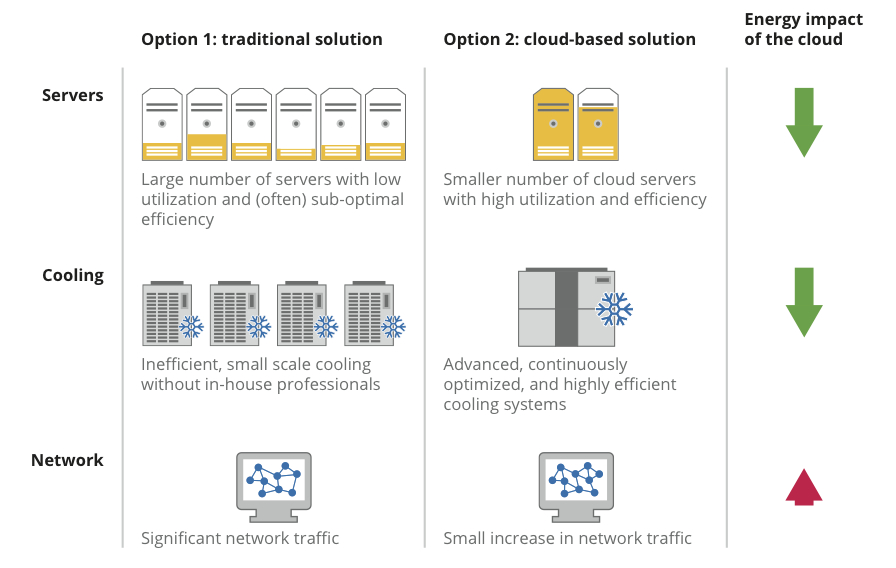
A typical organization has a lot more servers than it needs—for backup, failures and spikes in demand for computing. Cloud-based service providers like Google aggregate demand across thousands of people, substantially increasing how much servers are utilized. And our data centers use equipment and software specially designed to minimize energy use. The cloud can do the same work much more efficiently than locally hosted servers.
In fact, according to a study by the Carbon Disclosure Project, by migrating to the cloud, companies with over $1 billion in revenues in the U.S. and Europe could achieve substantial reductions in energy costs and carbon emissions by 2020:
We’ve built efficient data centers all over the world, even designing them in ways that make the best use of the natural environment, and we continue working to improve their performance. We think using the super-efficient cloud to deliver services like Google Apps can be part of the solution towards a more energy efficient future.
Posted by Urs Hoelzle, Senior Vice President for Technical Infrastructure
(Cross-posted on the Google Green Blog)
Lower energy use results in less carbon pollution and more energy saved for organizations. That’s what happened at the U.S. General Services Administration (GSA), which recently switched its approximately 17,000 users to Google Apps for Government. We found that the GSA was able to reduce server energy consumption by nearly 90 percent and carbon emissions by 85 percent. That means the GSA will save an estimated $285,000 annually on energy costs alone, a 93 percent cost reduction.
How is the cloud so energy efficient? It’s all about reducing energy use for servers and server cooling. Here’s how it works:
A typical organization has a lot more servers than it needs—for backup, failures and spikes in demand for computing. Cloud-based service providers like Google aggregate demand across thousands of people, substantially increasing how much servers are utilized. And our data centers use equipment and software specially designed to minimize energy use. The cloud can do the same work much more efficiently than locally hosted servers.
In fact, according to a study by the Carbon Disclosure Project, by migrating to the cloud, companies with over $1 billion in revenues in the U.S. and Europe could achieve substantial reductions in energy costs and carbon emissions by 2020:
- U.S. companies could save $12.3 billion and up to 85.7 million metric tonnes of CO2
- U.K. companies (PDF) would save £1.2 billion and more than 9.2 million metric tonnes of CO2
- French companies (PDF) could save nearly €700 million and 1.2 million metric tonnes of CO2
We’ve built efficient data centers all over the world, even designing them in ways that make the best use of the natural environment, and we continue working to improve their performance. We think using the super-efficient cloud to deliver services like Google Apps can be part of the solution towards a more energy efficient future.
Posted by Urs Hoelzle, Senior Vice President for Technical Infrastructure
(Cross-posted on the Google Green Blog)
Selasa, 05 Juni 2012
Google + Quickoffice = get more done anytime, anywhere
We're happy to announce that we have acquired Quickoffice, a leader in office productivity solutions.
Today, consumers, businesses and schools use Google Apps to get stuff done from anywhere, with anyone and on any device. Quickoffice has an established track record of enabling seamless interoperability with popular file formats, and we'll be working on bringing their powerful technology to our Apps product suite.
Quickoffice has a strong base of users, and we look forward to supporting them while we work on an even more seamless, intuitive and integrated experience.
We're excited to welcome the Quickoffice team and their users to Google.
Today, consumers, businesses and schools use Google Apps to get stuff done from anywhere, with anyone and on any device. Quickoffice has an established track record of enabling seamless interoperability with popular file formats, and we'll be working on bringing their powerful technology to our Apps product suite.
Quickoffice has a strong base of users, and we look forward to supporting them while we work on an even more seamless, intuitive and integrated experience.
We're excited to welcome the Quickoffice team and their users to Google.
Selasa, 15 Mei 2012
Follow an email’s journey with Story of Send
If you’re anything like me, you send and receive a lot of emails every day. But have you ever wondered where your message goes after you hit “send?” How does an email travel from your computer to your friend’s smartphone across the country or around the world?
We’re answering those questions with Story of Send, a new site that gives you a behind-the-scenes look into how all that virtual information makes its journey through the real world—from your Internet service provider to our data centers and beyond. Along the way, you’ll discover everything from where we filter for spam and scan for viruses to how we’re minimizing our impact on the environment through energy efficiency and renewable power.
We’ve included videos and photos throughout the journey so you can explore certain areas more deeply. For example, if you’re curious what data center servers look like, we’ve included some photos. Or you can watch a video to learn about how we purchase clean energy from wind farms near our data centers. And because technology doesn’t always have to be serious, you might find a vampire or two lurking around or uncover other surprises on the journey.
In the past, Gmail fans have shown us how emails connect people across the world. Now we’re providing a glimpse into how those emails go from one place to another. So hit send and start the journey today.
We’re answering those questions with Story of Send, a new site that gives you a behind-the-scenes look into how all that virtual information makes its journey through the real world—from your Internet service provider to our data centers and beyond. Along the way, you’ll discover everything from where we filter for spam and scan for viruses to how we’re minimizing our impact on the environment through energy efficiency and renewable power.
We’ve included videos and photos throughout the journey so you can explore certain areas more deeply. For example, if you’re curious what data center servers look like, we’ve included some photos. Or you can watch a video to learn about how we purchase clean energy from wind farms near our data centers. And because technology doesn’t always have to be serious, you might find a vampire or two lurking around or uncover other surprises on the journey.
In the past, Gmail fans have shown us how emails connect people across the world. Now we’re providing a glimpse into how those emails go from one place to another. So hit send and start the journey today.
Kamis, 10 Mei 2012
Celebrating our super-mom users
These days, moms use technology in a ton of creative and resourceful ways to keep their families running smoothly. As a working mom myself, I use Google Calendar to keep track of our three busy kids and all their different activities, sports and schools. Technology also keeps us connected—I’m always amazed at how a Google+ Hangout between my kids in California and their grandparents in France can make the distance between them feel so small.
In celebration of Mother’s Day this weekend, we thought we’d applaud the many tech-savvy super-moms out there by sharing a few of their stories.
Heather Fay, using Google+ to make her dream a reality
Heather, from New Haven, Conn., is a stay-at-home mom of two who has always had a passion for music and performing. Until recently, her music career took a backseat to her responsibilities at home, but when she signed up for Google+ in 2011, she realized she could find an audience using Hangouts—without stepping foot outside of her home. Now Heather can sing and play her guitar for people, no matter where they live in the world. Between changing diapers and cleaning up spilled cereal, she’s on Google+ engaging with more than 13,000 fans, collaborating with other musicians on an epic live concert and sharing the occasional mommy woes. You can find out more about her music on Google Play, where you can also hear a tribute to her daughter called “Ruby’s Song.”

Sarah Stocker, bringing robots to life with Chrome
Sarah, from San Francisco, is the co-founder of My Robot Nation, a Chrome web app that lets you create a unique robot online, then have it printed in full-color 3D and mailed to your door. When developing My Robot Nation, Sarah employed some of the most advanced web technologies, such as WebGL, to bring the 3D experience to the browser; however, making the app easy for people to use was paramount. Enter Sarah’s 10-year-old son Max. He designed the first robot and was My Robot Nation’s first “customer.” The fact that Max could create something online and then hold it in his hands made Sarah feel like the coolest mom ever—and he’s already told her that he wants to be an inventor, just like her.

Carol Galland Wildey and Danielle Yates, founders of Headcovers Unlimited
Almost 25 years ago, at the age of 40, Carol was diagnosed with breast cancer. After losing her hair due to chemotherapy treatments, she and her daughter Danielle realized how few options there were to help cancer patients look and feel like themselves throughout their treatment. In 1994, she and Danielle started Headcovers Unlimited, selling hats, wigs and scarves for patients with hair loss. Danielle helped take the business online in 1995, launching www.headcovers.com. Based in League City, Tex., the Internet helps them reach women in more than 60 countries; and more than half their customers have come through online advertising with AdWords.
.jpg)
Betty Givan, preserving family recipes with YouTube
For years, Betty has been cataloguing and saving family recipes to pass along to her own daughter. At first, she used a scrapbook of recipe cards, but one day, while making nachos for a football game, she decided to make a video of the process and asked her daughter to film it. Soon, she was filming and posting her favorites on a YouTube channel and today, it’s become her full-time business from her Richmond, Ky. home. With more than 1,100 videos of her southern cooking recipes and 16 million video views, Betty has become a mom to people all around the world.
Karen Castelletti, Googler reunited with her birth mother using Google Search
Not only can search help you find what you’re looking for, it can also help you reconnect with the people you care about. Karen grew up knowing she was adopted, and always thought it would be too difficult to find and connect with her birth parents. Then, when she was 22, she received a message from her birth mom, Mary Ellen. Mary Ellen found Karen's name through public birth records, and used Google Search to find one of Karen's social networking profiles. They reconnected in time for Mary Ellen to watch Karen graduate from college alongside her adoptive parents, and today they speak regularly.
I hope the stories of these super-moms have inspired you to use technology in ways that keep you connected, organized and creative, so you can spend more time doing the things that matter—having fun with your kids!
In celebration of Mother’s Day this weekend, we thought we’d applaud the many tech-savvy super-moms out there by sharing a few of their stories.
Heather Fay, using Google+ to make her dream a reality
Heather, from New Haven, Conn., is a stay-at-home mom of two who has always had a passion for music and performing. Until recently, her music career took a backseat to her responsibilities at home, but when she signed up for Google+ in 2011, she realized she could find an audience using Hangouts—without stepping foot outside of her home. Now Heather can sing and play her guitar for people, no matter where they live in the world. Between changing diapers and cleaning up spilled cereal, she’s on Google+ engaging with more than 13,000 fans, collaborating with other musicians on an epic live concert and sharing the occasional mommy woes. You can find out more about her music on Google Play, where you can also hear a tribute to her daughter called “Ruby’s Song.”

Sarah, from San Francisco, is the co-founder of My Robot Nation, a Chrome web app that lets you create a unique robot online, then have it printed in full-color 3D and mailed to your door. When developing My Robot Nation, Sarah employed some of the most advanced web technologies, such as WebGL, to bring the 3D experience to the browser; however, making the app easy for people to use was paramount. Enter Sarah’s 10-year-old son Max. He designed the first robot and was My Robot Nation’s first “customer.” The fact that Max could create something online and then hold it in his hands made Sarah feel like the coolest mom ever—and he’s already told her that he wants to be an inventor, just like her.

Almost 25 years ago, at the age of 40, Carol was diagnosed with breast cancer. After losing her hair due to chemotherapy treatments, she and her daughter Danielle realized how few options there were to help cancer patients look and feel like themselves throughout their treatment. In 1994, she and Danielle started Headcovers Unlimited, selling hats, wigs and scarves for patients with hair loss. Danielle helped take the business online in 1995, launching www.headcovers.com. Based in League City, Tex., the Internet helps them reach women in more than 60 countries; and more than half their customers have come through online advertising with AdWords.
.jpg)
For years, Betty has been cataloguing and saving family recipes to pass along to her own daughter. At first, she used a scrapbook of recipe cards, but one day, while making nachos for a football game, she decided to make a video of the process and asked her daughter to film it. Soon, she was filming and posting her favorites on a YouTube channel and today, it’s become her full-time business from her Richmond, Ky. home. With more than 1,100 videos of her southern cooking recipes and 16 million video views, Betty has become a mom to people all around the world.
Karen Castelletti, Googler reunited with her birth mother using Google Search
Not only can search help you find what you’re looking for, it can also help you reconnect with the people you care about. Karen grew up knowing she was adopted, and always thought it would be too difficult to find and connect with her birth parents. Then, when she was 22, she received a message from her birth mom, Mary Ellen. Mary Ellen found Karen's name through public birth records, and used Google Search to find one of Karen's social networking profiles. They reconnected in time for Mary Ellen to watch Karen graduate from college alongside her adoptive parents, and today they speak regularly.
I hope the stories of these super-moms have inspired you to use technology in ways that keep you connected, organized and creative, so you can spend more time doing the things that matter—having fun with your kids!
Rabu, 02 Mei 2012
Get stuff done in the cloud. Go Google.
You probably hear terms like “the cloud” or “cloud computing” being used a lot these days. While the idea of the cloud may seem abstract, many things you already do on your computer and smartphone today, such as email, photo sharing and video streaming, are made possible by the cloud.
At the heart of it, Google is about cloud computing—helping people live online and get things done in the cloud. Whether you need to add “milk” to a shared shopping list from the train, collaborate with your teammate back in the office to finish your presentation from a hotel lobby, or chat face-to-face with your mom from halfway around the world, we believe that getting stuff done in the cloud is a better way. We like to call it “going Google.”
We’ve built cloud-based tools like Gmail, Google Calendar and Google Docs to help you connect and collaborate online with others more quickly and easily, without having to deal with the hassles and frustrations of installing and managing traditional software. Last week’s launch of Google Drive is the next step: Google Drive brings together many Google services—documents, spreadsheets, images and more—all in one place so you can easily create, collaborate, and share in real-time. Files are saved automatically, and friends, teammates, roommates, families and co-workers can do things together—even when they’re not. If you haven’t already tried it, Google Drive is a great place to start going Google.
Today, hundreds of millions of people, including 16 million students and teachers at 66 of the top 100 U.S. universities, employees at more than 4 million businesses worldwide including Burberry, Costco and National Geographic (and maybe even your 13-year-old daughter and her entire soccer team) have all already gone Google.
If you’re going Google to build a company, great. If you write your grand opus poem, even better. If you have to turn a project around from different time zones overnight, awesome. And if you video-chat with grandma while you do—well, that’s just showing off.
So go on. See what it’s like to get stuff done and go Google.
At the heart of it, Google is about cloud computing—helping people live online and get things done in the cloud. Whether you need to add “milk” to a shared shopping list from the train, collaborate with your teammate back in the office to finish your presentation from a hotel lobby, or chat face-to-face with your mom from halfway around the world, we believe that getting stuff done in the cloud is a better way. We like to call it “going Google.”
We’ve built cloud-based tools like Gmail, Google Calendar and Google Docs to help you connect and collaborate online with others more quickly and easily, without having to deal with the hassles and frustrations of installing and managing traditional software. Last week’s launch of Google Drive is the next step: Google Drive brings together many Google services—documents, spreadsheets, images and more—all in one place so you can easily create, collaborate, and share in real-time. Files are saved automatically, and friends, teammates, roommates, families and co-workers can do things together—even when they’re not. If you haven’t already tried it, Google Drive is a great place to start going Google.
Today, hundreds of millions of people, including 16 million students and teachers at 66 of the top 100 U.S. universities, employees at more than 4 million businesses worldwide including Burberry, Costco and National Geographic (and maybe even your 13-year-old daughter and her entire soccer team) have all already gone Google.
If you’re going Google to build a company, great. If you write your grand opus poem, even better. If you have to turn a project around from different time zones overnight, awesome. And if you video-chat with grandma while you do—well, that’s just showing off.
So go on. See what it’s like to get stuff done and go Google.
Selasa, 24 April 2012
Introducing Google Drive... yes, really
Just like the Loch Ness Monster, you may have heard the rumors about Google Drive. It turns out, one of the two actually does exist.
Today, we’re introducing Google Drive—a place where you can create, share, collaborate, and keep all of your stuff. Whether you’re working with a friend on a joint research project, planning a wedding with your fiancé or tracking a budget with roommates, you can do it in Drive. You can upload and access all of your files, including videos, photos, Google Docs, PDFs and beyond.

With Google Drive, you can:
Drive is built to work seamlessly with your overall Google experience. You can attach photos from Drive to posts in Google+, and soon you’ll be able to attach stuff from Drive directly to emails in Gmail. Drive is also an open platform, so we’re working with many third-party developers so you can do things like send faxes, edit videos and create website mockups directly from Drive. To install these apps, visit the Chrome Web Store—and look out for even more useful apps in the future.
This is just the beginning for Google Drive; there’s a lot more to come.
Get started with Drive today at drive.google.com/start—and keep looking for Nessie...
Today, we’re introducing Google Drive—a place where you can create, share, collaborate, and keep all of your stuff. Whether you’re working with a friend on a joint research project, planning a wedding with your fiancé or tracking a budget with roommates, you can do it in Drive. You can upload and access all of your files, including videos, photos, Google Docs, PDFs and beyond.

With Google Drive, you can:
- Create and collaborate. Google Docs is built right into Google Drive, so you can work with others in real time on documents, spreadsheets and presentations. Once you choose to share content with others, you can add and reply to comments on anything (PDF, image, video file, etc.) and receive notifications when other people comment on shared items.
- Store everything safely and access it anywhere (especially while on the go). All your stuff is just... there. You can access your stuff from anywhere—on the web, in your home, at the office, while running errands and from all of your devices. You can install Drive on your Mac or PC and can download the Drive app to your Android phone or tablet. We’re also working hard on a Drive app for your iOS devices. And regardless of platform, blind users can access Drive with a screen reader.
- Search everything. Search by keyword and filter by file type, owner and more. Drive can even recognize text in scanned documents using Optical Character Recognition (OCR) technology. Let’s say you upload a scanned image of an old newspaper clipping. You can search for a word from the text of the actual article. We also use image recognition so that if you drag and drop photos from your Grand Canyon trip into Drive, you can later search for [grand canyon] and photos of its gorges should pop up. This technology is still in its early stages, and we expect it to get better over time.
Drive is built to work seamlessly with your overall Google experience. You can attach photos from Drive to posts in Google+, and soon you’ll be able to attach stuff from Drive directly to emails in Gmail. Drive is also an open platform, so we’re working with many third-party developers so you can do things like send faxes, edit videos and create website mockups directly from Drive. To install these apps, visit the Chrome Web Store—and look out for even more useful apps in the future.
This is just the beginning for Google Drive; there’s a lot more to come.
Get started with Drive today at drive.google.com/start—and keep looking for Nessie...
Selasa, 06 Maret 2012
Introducing Google Play: All your entertainment, anywhere you go
Entertainment is supposed to be fun. But in reality, getting everything to work can be the exact opposite—moving files between your computers, endless syncing across your devices, and wires…lots of wires. Today we’re eliminating all that hassle with Google Play, a digital entertainment destination where you can find, enjoy and share your favorite music, movies, books and apps on the web and on your Android phone or tablet. Google Play is entirely cloud-based so all your music, movies, books and apps are stored online, always available to you, and you never have to worry about losing them or moving them again.
With Google Play you can:
To celebrate, we’ll be offering a different album, book, video rental and Android app at a special price each day for the next week in our “7 Days to Play” sale. In the U.S., today’s titles include the collection of top 40 hits Now That's What I Call Music 41, the popular game Where's My Water, the novel Extremely Loud and Incredibly Close and the movie Puncture for just 25 cents each. In addition, you'll find great collections of hip-hop, rock and country albums for $3.99 all week, detective novels from $2.99, some of our editorial team's favorite movies from 99 cents, and our favorite apps from 49 cents.
In the U.S., music, movies, books and Android apps are available in Google Play. In Canada and the U.K., we’ll offer movies, books and Android apps; in Australia, books and apps; and in Japan, movies and apps. Everywhere else, Google Play will be the new home for Android apps. Our long-term goal is to roll out as many different types of content as possible to people around the world, and we’ll keep adding new content to keep it fresh.
To learn more, head over to play.google.com/about or keep up with the latest on our Google+ page. If you’re headed to Austin later this week for South by Southwest, come to the Google Village to see Google Play in action. We can’t wait for you to try Google Play and experience a simpler way to manage your entertainment.
With Google Play you can:
- Store up to 20,000 songs for free and buy millions of new tracks
- Download more than 450,000 Android apps and games
- Browse the world’s largest selection of eBooks
- Rent thousands of your favorite movies, including new releases and HD titles
To celebrate, we’ll be offering a different album, book, video rental and Android app at a special price each day for the next week in our “7 Days to Play” sale. In the U.S., today’s titles include the collection of top 40 hits Now That's What I Call Music 41, the popular game Where's My Water, the novel Extremely Loud and Incredibly Close and the movie Puncture for just 25 cents each. In addition, you'll find great collections of hip-hop, rock and country albums for $3.99 all week, detective novels from $2.99, some of our editorial team's favorite movies from 99 cents, and our favorite apps from 49 cents.
In the U.S., music, movies, books and Android apps are available in Google Play. In Canada and the U.K., we’ll offer movies, books and Android apps; in Australia, books and apps; and in Japan, movies and apps. Everywhere else, Google Play will be the new home for Android apps. Our long-term goal is to roll out as many different types of content as possible to people around the world, and we’ll keep adding new content to keep it fresh.
To learn more, head over to play.google.com/about or keep up with the latest on our Google+ page. If you’re headed to Austin later this week for South by Southwest, come to the Google Village to see Google Play in action. We can’t wait for you to try Google Play and experience a simpler way to manage your entertainment.
Rabu, 22 Februari 2012
Collaborate and edit anywhere with the updated Google Docs for Android
As I was sitting on the ferry commuting to Google’s Sydney office this morning, two thoughts occurred to me. First, Australia is beautiful. If you’ve never been here, you really should visit. And second, it’s amazing how productive I can be with just my Android phone and an Internet connection. I was responding to email, reading news articles and editing documents—just like I do at the office. Only the view was better!
We want to give everyone the chance to be productive no matter where they are, so today we’re releasing a new update to the Google Docs app for Android. We've brought the collaborative experience from Google Docs on the desktop to your Android device. You'll see updates in real time as others type on their computers, tablets and phones, and you can just tap the document to join in.
We also updated the interface to make it easier to work with your documents on the go. For example, you can pinch to zoom and focus on a specific paragraph or see the whole document at a glance. We also added rich text formatting so you can do things like create a quick bullet list, add color to your documents, or just bold something important. Watch the new Google Docs app in action:
If you want to hear about the latest Docs news or send us feedback on the new app, visit Google Docs on Google+.
Gotta run—I’ve got another ferry to catch!
We want to give everyone the chance to be productive no matter where they are, so today we’re releasing a new update to the Google Docs app for Android. We've brought the collaborative experience from Google Docs on the desktop to your Android device. You'll see updates in real time as others type on their computers, tablets and phones, and you can just tap the document to join in.
We also updated the interface to make it easier to work with your documents on the go. For example, you can pinch to zoom and focus on a specific paragraph or see the whole document at a glance. We also added rich text formatting so you can do things like create a quick bullet list, add color to your documents, or just bold something important. Watch the new Google Docs app in action:
If you want to hear about the latest Docs news or send us feedback on the new app, visit Google Docs on Google+.
Gotta run—I’ve got another ferry to catch!
Selasa, 20 Desember 2011
One more present under the tree—custom video messages from Santa
Last Friday Santa opened up the Ho Ho Hotline and teamed up with Gmail to send personalized holiday phone calls to anyone you know who has been nice (or naughty, for that matter) in the U.S. or Canada. In just a few days Santa has made hundreds of thousands of calls to your friends, family and loved ones, and received many a message from you at his Google Voice number (855-34-SANTA).
Santa has one more surprise in store. Starting today, anyone in the world can create and send a personalized cartoon video message (in English only) from Santa to anyone you know, anywhere in the world, and share them through email and Google+. Watch our sample video below and create your own at SendaCallFromSanta.com.
The Gmail team wishes you a happy holiday!
(Cross-posted from the Gmail blog)
Santa has one more surprise in store. Starting today, anyone in the world can create and send a personalized cartoon video message (in English only) from Santa to anyone you know, anywhere in the world, and share them through email and Google+. Watch our sample video below and create your own at SendaCallFromSanta.com.
The Gmail team wishes you a happy holiday!
(Cross-posted from the Gmail blog)
Jumat, 16 Desember 2011
Ho-ho-hold the phone: Santa’s on the line

This year, Santa wants you to reach out to him (after all, reindeer are only so-so conversationalists). If you or your family members have a special request for Santa, you can call him right from Gmail* and leave him a message at his Google Voice number: 855-34-SANTA. Santa won't be able to return messages himself—it’s a busy time of year for him—but he's promised to keep us up to date on happenings in the North Pole day by day.
You also can create and send a unique, customized phone call from Santa to anyone you know, from your nieces and nephews to old college friends, over the phone (to U.S. numbers only). Listen to a sample phone call, and send a message of your own from SendaCallFromSanta.com.
Of course, Santa is never one to fall behind the technological times (word on the street is that Rudolph’s nose was recently upgraded to an energy-efficient LED). So while the red suit may never go out of style, this year Santa has come up with an extra special way to spread the holiday cheer. But you’ll have to wait until it’s closer to Christmas to find out what it is. So no peeking—but keep checking the site!
Happy Holidays from your friends at Gmail.
*Calls from Gmail are free for U.S. and Canadian users, but will cost people outside those areas $.01/minute (plus any applicable VATs).
Google Apps highlights – 12/16/2011
This is part of a regular series of Google Apps updates that we post every couple of weeks. Look for the label “Google Apps highlights" and subscribe to the series. - Ed.
The elves got an early jump on the holidays this year by leaving us some surprises in Google Apps over the last few weeks. Sharing from Gmail got a whole lot easier, and Google Calendar can make better use of precious screen space. We also have 10 new Google Apps customer stories to share from the tens of thousands that have gone Google in recent weeks.
Gmail gets more social
Last week we sprinkled a touch of Google+ into Gmail, making it easier to connect and share with people from your inbox. You can add people to circles right from an email thread through Gmail’s people widget, share photo attachments with friends and family on Google+ without leaving Gmail, and view a filtered version of your inbox only showing messages from people in your circles. We also improved Gmail’s address book by incorporating contact information shared by your friends, family and colleagues in their Google+ profiles.

New features in the Gmail iOS app
Just yesterday we added several new improvements to the Gmail app for iOS 4+. Now you can set up a custom email signature for mobile messages, manage your vacation responder, and view nested labels from your iPhone, iPad or iPod Touch. We also added scribbles, a fun way to spice up messages by adding a quick hand-drawn sketch. You can create scribbles using a range of colors, brush sizes, lines, erasers and spray paints from your touchscreen device.

More free calls right from Gmail
Last year we introduced free domestic calling in Gmail within the U.S. and Canada, and we’re extending this free service for the whole year of 2012. We’re happy to help you keep in touch with those special people in your life, for free.
Hide morning and night hours in Calendar
If you don’t often have appointments early in the morning or late at night, a new trick in Google Calendar might be useful. Now you can hide morning and night hours, leaving more screen real estate for the times of day when most of your events take place. Give it a try in Calendar Labs.

Who’s gone Google?
Businesses and schools are switching to Google Apps in droves these days. From tiny startups to large enterprises and nonprofits to college campuses, we love hearing the inspiring stories that our customers share. Here’s a new batch of stories for your reading pleasure: TripIt, IPSEN, Ebby Halliday, Ticket River, VigLink, HeyZap, The Great Books Foundation, Utah K-12 schools, the U.S. Coast Guard Academy and UC Santa Cruz. Welcome one and all!
For more details and the latest news, check out the Google Apps Blog, and keep an eye out for this series here after the holidays. We launched more than 150 improvements to Google Apps in 2011, and we have a ton more in store for 2012!
The elves got an early jump on the holidays this year by leaving us some surprises in Google Apps over the last few weeks. Sharing from Gmail got a whole lot easier, and Google Calendar can make better use of precious screen space. We also have 10 new Google Apps customer stories to share from the tens of thousands that have gone Google in recent weeks.
Gmail gets more social
Last week we sprinkled a touch of Google+ into Gmail, making it easier to connect and share with people from your inbox. You can add people to circles right from an email thread through Gmail’s people widget, share photo attachments with friends and family on Google+ without leaving Gmail, and view a filtered version of your inbox only showing messages from people in your circles. We also improved Gmail’s address book by incorporating contact information shared by your friends, family and colleagues in their Google+ profiles.

New features in the Gmail iOS app
Just yesterday we added several new improvements to the Gmail app for iOS 4+. Now you can set up a custom email signature for mobile messages, manage your vacation responder, and view nested labels from your iPhone, iPad or iPod Touch. We also added scribbles, a fun way to spice up messages by adding a quick hand-drawn sketch. You can create scribbles using a range of colors, brush sizes, lines, erasers and spray paints from your touchscreen device.

More free calls right from Gmail
Last year we introduced free domestic calling in Gmail within the U.S. and Canada, and we’re extending this free service for the whole year of 2012. We’re happy to help you keep in touch with those special people in your life, for free.
Hide morning and night hours in Calendar
If you don’t often have appointments early in the morning or late at night, a new trick in Google Calendar might be useful. Now you can hide morning and night hours, leaving more screen real estate for the times of day when most of your events take place. Give it a try in Calendar Labs.

Who’s gone Google?
Businesses and schools are switching to Google Apps in droves these days. From tiny startups to large enterprises and nonprofits to college campuses, we love hearing the inspiring stories that our customers share. Here’s a new batch of stories for your reading pleasure: TripIt, IPSEN, Ebby Halliday, Ticket River, VigLink, HeyZap, The Great Books Foundation, Utah K-12 schools, the U.S. Coast Guard Academy and UC Santa Cruz. Welcome one and all!
For more details and the latest news, check out the Google Apps Blog, and keep an eye out for this series here after the holidays. We launched more than 150 improvements to Google Apps in 2011, and we have a ton more in store for 2012!
Kamis, 08 Desember 2011
Gmail and Contacts get better with Google+
We want to bring you a great experience across all Google products which, for Gmail and Contacts, means understanding what you care about and delivering it instantly. With that in mind, we’re introducing some new integrations with Google+ that we think will make Gmail and Contacts even better. If you use Google+, you can now grow your circles, filter emails and contacts by circles, keep all your contact information up-to-date automatically and share photos to Google+, all right from Gmail and Contacts.
Grow your circles from your email
Now when you open an email from someone on Google+, you can see the most recent post they’ve shared with you on the right-hand side of the conversation. If they’re not in your circles yet, it’s easy to add them straight from Gmail.

Find information from the people you care about most
Looking for the info on an upcoming family holiday gathering but can't remember who sent it? If you've spent time building your Google+ circles, you can now quickly use them to filter your mail, saving yourself from having to sift through that pile of daily deal emails and newsletters. You can see messages from all of your circles at once or from each individual circle. And if you want, you can show circle names on emails in your inbox. Contacts can also be filtered by circles, making it easier to view your social connections.

Keep your contact information up-to-date automatically
Manually entering contact information can be a huge time drain—so let your circles do it for you. If your contacts have a Google profile, their contact entry in Gmail will be updated with the profile information they’ve shared with you, including phone numbers, email addresses and more. If they change it in the future, you’ll get those updates automatically. You can also make sure the people you care about have your most up-to-date contact information by updating your own Google profile and sharing it.

Share effortlessly without leaving your inbox
Lots of great images are sent through email, but sharing those photos with friends on Google+ used to require downloading the image from Gmail and re-uploading to your profile. Not anymore: Now you can share photo attachments with one quick click. The image(s) will be uploaded to your Google+ photos and be viewable only to the circles that you choose to share with.

We’ll be rolling out all of these changes out over the next few days to Gmail, Gmail Contacts and the “standalone” version of Google Contacts at contacts.google.com. Please note that Google Apps users won’t see the Contacts updates quite yet, but we’re actively working to make them available.
All of these features (and the more to come) are the result of the great discussion that we had on Google+ with users in July. If you want to join in discussions like these, add the Gmail Google+ page to your circles. And if you haven't signed up for Google+ and would like to try these new features, visit this page to get started.
Grow your circles from your email
Now when you open an email from someone on Google+, you can see the most recent post they’ve shared with you on the right-hand side of the conversation. If they’re not in your circles yet, it’s easy to add them straight from Gmail.
Find information from the people you care about most
Looking for the info on an upcoming family holiday gathering but can't remember who sent it? If you've spent time building your Google+ circles, you can now quickly use them to filter your mail, saving yourself from having to sift through that pile of daily deal emails and newsletters. You can see messages from all of your circles at once or from each individual circle. And if you want, you can show circle names on emails in your inbox. Contacts can also be filtered by circles, making it easier to view your social connections.
Keep your contact information up-to-date automatically
Manually entering contact information can be a huge time drain—so let your circles do it for you. If your contacts have a Google profile, their contact entry in Gmail will be updated with the profile information they’ve shared with you, including phone numbers, email addresses and more. If they change it in the future, you’ll get those updates automatically. You can also make sure the people you care about have your most up-to-date contact information by updating your own Google profile and sharing it.
Share effortlessly without leaving your inbox
Lots of great images are sent through email, but sharing those photos with friends on Google+ used to require downloading the image from Gmail and re-uploading to your profile. Not anymore: Now you can share photo attachments with one quick click. The image(s) will be uploaded to your Google+ photos and be viewable only to the circles that you choose to share with.

We’ll be rolling out all of these changes out over the next few days to Gmail, Gmail Contacts and the “standalone” version of Google Contacts at contacts.google.com. Please note that Google Apps users won’t see the Contacts updates quite yet, but we’re actively working to make them available.
All of these features (and the more to come) are the result of the great discussion that we had on Google+ with users in July. If you want to join in discussions like these, add the Gmail Google+ page to your circles. And if you haven't signed up for Google+ and would like to try these new features, visit this page to get started.
Rabu, 07 Desember 2011
Atmosphere 2011: A view from the cloud
Last month 350 CIOs and thousands of live stream viewers joined us for Atmosphere 2011, our annual cloud event. Leading companies from around the world came to explore how businesses are using the web to drive collaboration, innovation and growth in their organizations. In case you missed them, the keynotes are now available on our YouTube channel. You can watch the entire conference in order on the Atmosphere playlist.
This year’s speakers included a best-selling author, award-winning computer scientists, Google executives and product managers, and several Google Apps customers including Flint Waters, CIO of the state of Wyoming, Bryson Koehler, SVP of Global Revenue and Guest Technology at IHG, Michael O’Brien, CIO of Journal Communications and Christine Atkins, VP of Group IT at Ahold.
One of the highlights was listening to Christine Atkins talk about Ahold’s experience moving 55,000 users to Google Apps and how, in her words, “Google Apps is helping us deliver on the promise that we've all been seeking: that of strong collaboration platforms that help our company come together and work together.” You can watch Christine’s presentation here:
This year’s speakers included a best-selling author, award-winning computer scientists, Google executives and product managers, and several Google Apps customers including Flint Waters, CIO of the state of Wyoming, Bryson Koehler, SVP of Global Revenue and Guest Technology at IHG, Michael O’Brien, CIO of Journal Communications and Christine Atkins, VP of Group IT at Ahold.
One of the highlights was listening to Christine Atkins talk about Ahold’s experience moving 55,000 users to Google Apps and how, in her words, “Google Apps is helping us deliver on the promise that we've all been seeking: that of strong collaboration platforms that help our company come together and work together.” You can watch Christine’s presentation here:
Jumat, 18 November 2011
Google Apps highlights – 11/18/2011
This is part of a regular series of Google Apps updates that we post every couple of weeks. Look for the label “Google Apps highlights" and subscribe to the series. - Ed.
The last few weeks have brought a fresh new look in Gmail, more mobile access options and simpler meeting scheduling tools. Millions of organizations using Google Apps can now use Google+ on their business and university accounts, and we launched a couple Apps-related Google+ Pages ourselves.
Gmail’s new look
Back in July we previewed Gmail’s new look, and a couple weeks ago we started letting people switch to the new design with one click. The refreshed interface makes it easier to follow conversations and spot the sender with profile pictures for each message. The new look also supports dynamic screen densities, so Gmail displays properly whether you’re viewing on a large desktop monitor or a smaller mobile screen. We also added a selection of beautiful HD themes to the existing gallery. Finally, we made it easier to perform advanced email searches using a panel of powerful search options that reveals with a single click.
Gmail app for iOS devices
This month we introduced the Gmail app for the iPhone, iPad and iPod touch, complete with mobile alerts for new mail, a responsive touch screen interface and Gmail mainstays like fast search, conversation view and address auto-complete.

Suggested meeting times in Google Calendar
We’ve heard how frustrating it can be to spend 15 minutes finding a good time for people to convene for a 30 minute meeting, so we made it easier to find a good meeting time in Google Calendar. The suggested times feature automatically reviews the availability of meeting invitees, and proposes event times that work for the whole group.

Google+ for organizations using Google Apps
Businesses, schools and organizations with Google Apps can now use Google+. Employees and students can create profiles, +1 things they like on the web, share interesting content with their circles and have live multi-person video chats with classmates, colleagues and friends. Organizations can also create their Google+ Pages—an organization’s identity on Google+ for customers, students or fans. We’re using Google+ Pages ourselves, so take a look at the Gmail and Google Enterprise pages, and circle us if you’d like to stay in the loop.
24x7 telephone support and improved mobile device management
This week, we introduced a couple other new benefits for Google Apps customers. Organizations of all sizes around the world can now call our support hotline at any time for all core service issue. Also new this week, we improved our mobile device management capabilities with an interface for administrators to view and deny mobile devices connecting to Google Apps, granular mobile policy controls, and the ability to visualize mobile usage trends across the organization.

Who’s gone Google?
Organizations large and small continue to amass around Google Apps. We’re thrilled to welcome a whole host of new customers including the Trinity Mirror Group (Britain’s largest newspaper publisher), startups such as JobFlo and UserTesting, organizations including the U.S. Holocaust Memorial Museum, and colleges like the University of Michigan and UT Austin. Welcome to all!
I hope these product updates and customer stories help you and your organization get even more from Google Apps. For more details and the latest news, check out the Google Apps Blog.
The last few weeks have brought a fresh new look in Gmail, more mobile access options and simpler meeting scheduling tools. Millions of organizations using Google Apps can now use Google+ on their business and university accounts, and we launched a couple Apps-related Google+ Pages ourselves.
Gmail’s new look
Back in July we previewed Gmail’s new look, and a couple weeks ago we started letting people switch to the new design with one click. The refreshed interface makes it easier to follow conversations and spot the sender with profile pictures for each message. The new look also supports dynamic screen densities, so Gmail displays properly whether you’re viewing on a large desktop monitor or a smaller mobile screen. We also added a selection of beautiful HD themes to the existing gallery. Finally, we made it easier to perform advanced email searches using a panel of powerful search options that reveals with a single click.
Gmail app for iOS devices
This month we introduced the Gmail app for the iPhone, iPad and iPod touch, complete with mobile alerts for new mail, a responsive touch screen interface and Gmail mainstays like fast search, conversation view and address auto-complete.

Suggested meeting times in Google Calendar
We’ve heard how frustrating it can be to spend 15 minutes finding a good time for people to convene for a 30 minute meeting, so we made it easier to find a good meeting time in Google Calendar. The suggested times feature automatically reviews the availability of meeting invitees, and proposes event times that work for the whole group.

Google+ for organizations using Google Apps
Businesses, schools and organizations with Google Apps can now use Google+. Employees and students can create profiles, +1 things they like on the web, share interesting content with their circles and have live multi-person video chats with classmates, colleagues and friends. Organizations can also create their Google+ Pages—an organization’s identity on Google+ for customers, students or fans. We’re using Google+ Pages ourselves, so take a look at the Gmail and Google Enterprise pages, and circle us if you’d like to stay in the loop.
24x7 telephone support and improved mobile device management
This week, we introduced a couple other new benefits for Google Apps customers. Organizations of all sizes around the world can now call our support hotline at any time for all core service issue. Also new this week, we improved our mobile device management capabilities with an interface for administrators to view and deny mobile devices connecting to Google Apps, granular mobile policy controls, and the ability to visualize mobile usage trends across the organization.

Who’s gone Google?
Organizations large and small continue to amass around Google Apps. We’re thrilled to welcome a whole host of new customers including the Trinity Mirror Group (Britain’s largest newspaper publisher), startups such as JobFlo and UserTesting, organizations including the U.S. Holocaust Memorial Museum, and colleges like the University of Michigan and UT Austin. Welcome to all!
I hope these product updates and customer stories help you and your organization get even more from Google Apps. For more details and the latest news, check out the Google Apps Blog.
Rabu, 02 November 2011
Go Blue, go Google
I’m one of hundreds of University of Michigan alumni currently working at Google. So is this guy. I’m proud to have a degree from U-M—and that we made it to two Rose Bowls and one Final Four during my time there. But I’m even more proud that today we’re welcoming my alma mater to the Google Apps for Education family. By providing our cloud services to the entire university community, we’ll continue to build on the strong relationship that Google and the University of Michigan have had for many years. Many other alums—especially in our Ann Arbor office—are just as excited as I am:
Over a year ago, the University of Michigan (U-M) announced a new IT strategy known as NextGen Michigan, a plan to upgrade technology across the campus. Laura Patterson, U-M’s Chief Information Office, told us the switch to Google is just one of many projects that will make up U-M’s multi-year strategy for changing the approach to IT service and investing more heavily in technologies that will advance the university’s academic, teaching, research and clinical programs. She said: “Adopting Google Apps for Education will help support U-M’s leadership in teaching, learning and discovery, as well as improve collaboration across campus.”
As their first order of business, U-M kicked off a project to select a unified messaging and collaboration platform to help consolidate the more than 40 email and calendar tools which currently service about 90,000 students, faculty and staff. After a review process that included townhall meetings and a campus survey, the university’s IT steering committee overwhelmingly recommended Google Apps for Education as U-M’s preferred provider.
In addition to the suite of products in Google Apps for Education, U-M also plans to use APIs to build rich integration with existing campus services and encourage increased collaboration.
Hail to the Victors—The University of Michigan is going Google!
Over a year ago, the University of Michigan (U-M) announced a new IT strategy known as NextGen Michigan, a plan to upgrade technology across the campus. Laura Patterson, U-M’s Chief Information Office, told us the switch to Google is just one of many projects that will make up U-M’s multi-year strategy for changing the approach to IT service and investing more heavily in technologies that will advance the university’s academic, teaching, research and clinical programs. She said: “Adopting Google Apps for Education will help support U-M’s leadership in teaching, learning and discovery, as well as improve collaboration across campus.”
As their first order of business, U-M kicked off a project to select a unified messaging and collaboration platform to help consolidate the more than 40 email and calendar tools which currently service about 90,000 students, faculty and staff. After a review process that included townhall meetings and a campus survey, the university’s IT steering committee overwhelmingly recommended Google Apps for Education as U-M’s preferred provider.
In addition to the suite of products in Google Apps for Education, U-M also plans to use APIs to build rich integration with existing campus services and encourage increased collaboration.
Hail to the Victors—The University of Michigan is going Google!
Selasa, 01 November 2011
Gmail’s new look
Back in July we showed you a preview of Gmail's new look, and we’ve been working this summer to make even more updates and improvements. Today, we’re giving you an in-depth look at the new design. If you like what you see, over the next few days you’ll be able to switch to the new look by clicking on Switch to the new look in the bottom-right of Gmail.
Streamlined conversations
Conversation view has been completely redesigned to help you read through your email threads. You’ll now see profiles pictures for your contacts, so it’s easier to keep track of who said what. We also stripped out as much as possible so you can focus on communicating with your friends and colleagues.

Elastic density
We know that you use Gmail from a variety of screen sizes and devices, so now the spacing between elements on the screen will automatically change based on the kind of display you’re using. If you prefer a denser view all the time, you can change your density manually in the Settings menu.

New HD themes
Themes have been completely rebuilt to enable us to bring you a new set of beautiful high resolution themes with imagery provided by iStockphoto. We've updated most of the old favorites as well and your theme will be automatically carried over to the new look. Go to the Settings menu to take another look at themes and choose the one that fits you best.

Smarter navigation
The navigation panel on the left keeps your labels and chat contacts in view at all times. It's also more customizable: you can resize the labels and chat areas if you want to see more, or hide the chat area entirely via the chat icon in the lower left. You can also use the arrow keys to navigate around the interface.

Better search
Click the dropdown in the search box to see a new advanced search panel, which makes it easier and faster to find exactly what you're looking for. You can use the same panel to create a filter from any search in just a few clicks.

We’re excited to finally share Gmail’s new look with you. We’ll be bringing these changes to everyone soon, but if you’d like to make the switch right away, we’re rolling out a Switch to the new look link in the bottom-right of Gmail over the next few days.
(Cross-posted from the Gmail Blog)
Streamlined conversations
Conversation view has been completely redesigned to help you read through your email threads. You’ll now see profiles pictures for your contacts, so it’s easier to keep track of who said what. We also stripped out as much as possible so you can focus on communicating with your friends and colleagues.

Elastic density
We know that you use Gmail from a variety of screen sizes and devices, so now the spacing between elements on the screen will automatically change based on the kind of display you’re using. If you prefer a denser view all the time, you can change your density manually in the Settings menu.

New HD themes
Themes have been completely rebuilt to enable us to bring you a new set of beautiful high resolution themes with imagery provided by iStockphoto. We've updated most of the old favorites as well and your theme will be automatically carried over to the new look. Go to the Settings menu to take another look at themes and choose the one that fits you best.

Smarter navigation
The navigation panel on the left keeps your labels and chat contacts in view at all times. It's also more customizable: you can resize the labels and chat areas if you want to see more, or hide the chat area entirely via the chat icon in the lower left. You can also use the arrow keys to navigate around the interface.

Better search
Click the dropdown in the search box to see a new advanced search panel, which makes it easier and faster to find exactly what you're looking for. You can use the same panel to create a filter from any search in just a few clicks.

We’re excited to finally share Gmail’s new look with you. We’ll be bringing these changes to everyone soon, but if you’d like to make the switch right away, we’re rolling out a Switch to the new look link in the bottom-right of Gmail over the next few days.
(Cross-posted from the Gmail Blog)
Rabu, 26 Oktober 2011
Let freedom (from servers) ring: EDUCAUSE 2011
This time last year, we were tailgating with the USC marching band at the EDUCAUSE conference—an annual gathering of the higher-education IT community. Last week, with more than 15 million people now actively using Google Apps for Education, we ventured to Philadelphia for a few jam-packed days at EDUCAUSE 2011. Our time in the city of brotherly love included a booth with 30+ Googlers and a woodsy backdrop for our fireside chat series; meeting with hundreds of CIOs from universities using and considering Google Apps for Education; a party at the Academy of Natural Sciences; and of course liberty and the lifelong pursuit of the Philly cheesesteak. Here’s a glimpse:
The Campus Computing Project released its annual report at EDUCAUSE, too. This year’s survey named Google as the leading provider of outsourced cloud-based campus email services. According to the survey, 89 percent of higher education institutions are either already using or considering switching to cloud-based solutions. Of four-year colleges and universities (including community colleges) that have already moved to the cloud, more than 56 percent have gone Google—including 64 percent of public universities and 66 percent of private universities.
Last month we shared that 61 of US News and World Report’s top 100 Universities are using Google Apps for Education. That number’s now up to 62, and is still just a snapshot of the thousands of institutions using Apps on campus. Schools that have recently selected Apps for Education as their collaboration platform include Harvard University, University of Texas at Austin, Wellesley College, University of Amsterdam, Stanford Graduate School of Business, University of York and University of Bristol.
In addition to these new schools, we’re also bringing some new integrations to Apps:
The Campus Computing Project released its annual report at EDUCAUSE, too. This year’s survey named Google as the leading provider of outsourced cloud-based campus email services. According to the survey, 89 percent of higher education institutions are either already using or considering switching to cloud-based solutions. Of four-year colleges and universities (including community colleges) that have already moved to the cloud, more than 56 percent have gone Google—including 64 percent of public universities and 66 percent of private universities.
Last month we shared that 61 of US News and World Report’s top 100 Universities are using Google Apps for Education. That number’s now up to 62, and is still just a snapshot of the thousands of institutions using Apps on campus. Schools that have recently selected Apps for Education as their collaboration platform include Harvard University, University of Texas at Austin, Wellesley College, University of Amsterdam, Stanford Graduate School of Business, University of York and University of Bristol.
In addition to these new schools, we’re also bringing some new integrations to Apps:
- OpenClass: Pearson has developed a free cloud-based Learning Management System that is tightly integrated with Google Apps and provides a new kind of learning environment that stimulates social learning. This is available in the Apps Marketplace.
- SlideRocket EDU: This presentation software integrated for cloud-based collaborative education enables you to unleash the creation, sharing and communication of ideas with an online application that connects with content in Google Apps for Education and is available on any device or browser. This is available in the Apps Marketplace.
- Blackboard Bboogle: Last year, Northwestern University presented their popular Bboogle (Blackboard + Google) application at our EDUCAUSE booth. Bboogle has now been certified by Blackboard and is available to other universities as a Building Block through Blackboard’s Extensions website. Bboogle enables instructors to link Blackboard course sites directly to Google Docs, Calendars and Sites without requiring a second login. And by automatically setting permissions for editing, it helps encourage and facilitate collaborative instruction.
- Desire2Learn: Users will soon be able to add widgets to Course Homepages that make it easy to view unread email messages in Gmail, keep track of upcoming events in Calendar, and submit assignments created in Docs.
Sabtu, 22 Oktober 2011
Google Apps highlights – 10/22/2011
This is part of a regular series of Google Apps updates that we post every couple of weeks. Look for the label “Google Apps highlights" and subscribe to the series. - Ed.
In the spirit of helping people work better together, over the last few weeks we made big improvements to Google presentations, introduced a version of Google Docs optimized for Android tablets, and enabled more dynamic content in Google Sites. We also celebrated the fact that Silicon Valley has gone Google!
Google presentations reloaded
On Tuesday we launched a completely rebuilt version of our web-based presentations application, so you can build more beautiful presentations together with colleagues and classmates. Google presentations now lets you make great-looking slides with animated builds, advanced slide transitions and better support for drawings, tables and themes. Plus, we made it easier to create presentations with others, without the hassles of attachments. Your whole team can work together in the same version of a presentation at the same time, and you can see who’s doing what, chat with others, and see a full revision history at any moment in time.

Google Docs on Android tablets
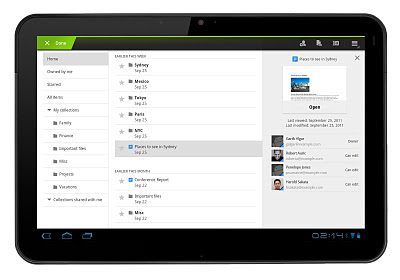
We’ve made it faster and easier to work with Google Docs on Android tablets with a new version of the Android application that takes full advantage of larger screen real estate. The three-panel view lets you browse filters and collections, see your document list and view file thumbnails and details simultaneously. You can get the Google Docs Android app for free from the Android Market.
Charts in Google Sites
Charts are often created in spreadsheets, but sometimes you want charts to appear in other places, like your team or project sites. In Google Sites, now you can select “Chart” from the “Insert” menu, and navigate to the Google Spreadsheet where your chart or data is located. You can also choose to have your site’s chart update in real-time when someone updates the underlying spreadsheet.

New look for Google Docs and Sites
We started rolling out a new look in Google Docs a couple months ago, and now this new design is available throughout all our collaboration tools. In addition to a cleaner, simpler design, we’ve made it more clear when your files are being auto-saved and added new icons to help you see at-a-glance who your docs are shared with. You can also customize the overall “density” of screen information, a great feature if you want to fit more onto a smaller display.

Who’s gone Google?
Successful small businesses tend to stay laser-focused on improving their core businesses, without getting distracted by peripheral activities that don’t make them more competitive. For example, most small businesses don’t want to spend time or money developing in-house expertise to run email and other IT systems. Case in point: 97 percent of Business Insider’s “Silicon Valley Startups to Watch” use Google Apps.
More than 5,000 businesses and thousands of other organizations start using Google Apps every single day, and more of our customers have shared their stories recently so you can hear why. A warm welcome goes out to Philz Coffee, Mid-Atlantic Door Group, Bradford & Barthel, LLP and the City of Mesquite, Nevada.
I hope these product updates and customer stories help you and your organization get even more from Google Apps. For more details and the latest news, check out the Google Apps Blog.
In the spirit of helping people work better together, over the last few weeks we made big improvements to Google presentations, introduced a version of Google Docs optimized for Android tablets, and enabled more dynamic content in Google Sites. We also celebrated the fact that Silicon Valley has gone Google!
Google presentations reloaded
On Tuesday we launched a completely rebuilt version of our web-based presentations application, so you can build more beautiful presentations together with colleagues and classmates. Google presentations now lets you make great-looking slides with animated builds, advanced slide transitions and better support for drawings, tables and themes. Plus, we made it easier to create presentations with others, without the hassles of attachments. Your whole team can work together in the same version of a presentation at the same time, and you can see who’s doing what, chat with others, and see a full revision history at any moment in time.

Google Docs on Android tablets
We’ve made it faster and easier to work with Google Docs on Android tablets with a new version of the Android application that takes full advantage of larger screen real estate. The three-panel view lets you browse filters and collections, see your document list and view file thumbnails and details simultaneously. You can get the Google Docs Android app for free from the Android Market.

Charts in Google Sites
Charts are often created in spreadsheets, but sometimes you want charts to appear in other places, like your team or project sites. In Google Sites, now you can select “Chart” from the “Insert” menu, and navigate to the Google Spreadsheet where your chart or data is located. You can also choose to have your site’s chart update in real-time when someone updates the underlying spreadsheet.

New look for Google Docs and Sites
We started rolling out a new look in Google Docs a couple months ago, and now this new design is available throughout all our collaboration tools. In addition to a cleaner, simpler design, we’ve made it more clear when your files are being auto-saved and added new icons to help you see at-a-glance who your docs are shared with. You can also customize the overall “density” of screen information, a great feature if you want to fit more onto a smaller display.

Who’s gone Google?
Successful small businesses tend to stay laser-focused on improving their core businesses, without getting distracted by peripheral activities that don’t make them more competitive. For example, most small businesses don’t want to spend time or money developing in-house expertise to run email and other IT systems. Case in point: 97 percent of Business Insider’s “Silicon Valley Startups to Watch” use Google Apps.
More than 5,000 businesses and thousands of other organizations start using Google Apps every single day, and more of our customers have shared their stories recently so you can hear why. A warm welcome goes out to Philz Coffee, Mid-Atlantic Door Group, Bradford & Barthel, LLP and the City of Mesquite, Nevada.
I hope these product updates and customer stories help you and your organization get even more from Google Apps. For more details and the latest news, check out the Google Apps Blog.
Langganan:
Postingan (Atom)