(Cross-posted on the Official Android Blog)
Last year at Google I/O, we talked about momentum, mobile and more. This year, we’re picking up right where we left off. More than 400 million Android devices have now been activated—up from 100 million last June. And twelve new Android devices are activated every every second—that’s more than 1 million a day. Today, we’re rolling out a new version of Android called Jelly Bean, adding more entertainment to Google Play, and introducing two powerful—yet distinctly different Nexus devices to bring you the best of Google.
Jelly Bean: simple, beautiful and beyond smart
Jelly Bean builds on top of Ice Cream Sandwich. It makes everything smoother, faster and more fluid. For example, notifications are now more dynamic: if you’re late for a meeting or missed a call, you can email or call directly from notifications. The keyboard is smarter and more accurate, and can predict your next word. And voice typing is faster, working even when you don’t have a data connection.
We’ve redesigned search from the ground up in Jelly Bean, with a new user interface and faster, more natural Voice Search. You can type your query or simply ask Google a question. Google can speak back to you, delivering a precise answer, powered by the Knowledge Graph, if it knows one, in addition to a list of search results.
Today’s smart devices still rely on you to do pretty much everything—that is, until now. Google Now is a new feature that gets you just the right information at just the right time. It tells you today’s weather before you start your day, how much traffic to expect before you leave for work, or your favorite team's score as they’re playing. There’s no digging required: cards appear at the moment you need them most.
Starting in mid-July, we’ll start rolling out over-the-air updates to Galaxy Nexus, Motorola Xoom and Nexus S, and we’ll also release Jelly Bean to open source.
Google Play: more entertainment
Google Play is your digital entertainment destination, with more than 600,000 apps and games plus music, movies and books. It’s entirely cloud-based, which means all of your content is always available across all of your devices. Today our store is expanding to include magazines. We’ve been working with leading publishers Condé Nast, Hearst, Meredith and more to offer magazines like House Beautiful, Men’s Health, Shape and WIRED.
Now, you can also purchase movies in addition to renting them. And we’re adding television shows on Google Play—in fact, we’re adding thousands of episodes of broadcast and cable TV shows, like "Revenge," "Parks & Recreation" and "Breaking Bad," from some of the top studios, like ABC Studios, NBCUniversal and Sony Pictures. You can play back movies and TV shows on all your Android devices, through Google Play on the web, and on YouTube, and soon we’ll bring the experience to Google TV devices.
Movie purchases, TV shows and magazines are available today on play.google.com, and will roll out to Google Play on devices over the coming days.
Nexus 7: powerful, portable and designed for Google Play
All of this great Google Play content comes to life on Nexus 7, a powerful new tablet with a vibrant, 7” 1280x800 HD display. The Tegra-3 chipset, with a quad-core CPU and 12-core GPU, makes everything, including games, extremely fast. And best of all, it’s only 340 grams, lighter than most tablets out there. Nexus 7 was built to bring you the best of Google in the palm of your hand. Hang out with up to 10 friends on Google+ using the front-facing camera, browse the web blazingly fast with Chrome and, of course, crank through your emails with Gmail.
Nexus 7 comes preloaded with some great entertainment, including the movie "Transformers: Dark of the Moon," the book “The Bourne Dominion,” magazines like Condé Nast Traveler and Popular Science, and songs from bands like Coldplay and the Rolling Stones. We’ve also included a $25 credit to purchase your favorite movies, books and more from Google Play, for a limited time. Nexus 7 is available for preorder today from Google Play in the U.S., U.K., Canada and Australia, and starts at $199 in the U.S. It will start shipping mid-July.
Nexus Q: It’s a sphere!
It's great to be able to take your entertainment with you wherever you go, but sometimes you want to ditch the headphones and enjoy music with friends and family. So we’re introducing Nexus Q, which combines the power of Android and Google Play to easily stream music and video in your home—all controlled by an Android phone or tablet. Designed and engineered by Google, Nexus Q is a small sphere that plugs into the best speakers and TV in your house. It’s the first-ever social streaming device—like a cloud-connected jukebox where everyone brings their own music to the party. Available first in the U.S., you can preorder Nexus Q today from Google Play for $299, and it will ship mid-July.
If you own one of the 400 million Android devices out there, you already know that it’s much more than simply a phone or tablet. It’s your connection to the best of Google—all of your stuff and entertainment, everywhere you go. Now you have a new version of Android, more entertainment and a growing portfolio of Nexus devices to choose from—all available in Google Play. The playground is open.
Tampilkan postingan dengan label mobile. Tampilkan semua postingan
Tampilkan postingan dengan label mobile. Tampilkan semua postingan
Rabu, 27 Juni 2012

Kamis, 07 Juni 2012
AdWords, meet AdMob
Mobile advertising has become a core part of marketers’ and publishers’ digital strategies, helping to fuel business growth and great content.
To make mobile ad buying seamless and accessible for more than a million AdWords advertisers, today we're integrating our AdMob technology directly into our AdWords system. This enables advertisers to run effective campaigns across the more than 300,000 mobile applications running ads by AdMob—all from within the AdWords interface. It also helps AdMob developers and publishers increase their revenue by giving them access to a large number of new advertisers. AdWords advertisers can now manage, measure and adjust search, display and video ads, reaching people on more than 2 million websites and hundreds of thousands of apps, across all screens.
Bringing together the best of AdWords with the best of AdMob is an important step in building integrated solutions that help all businesses get the most out of digital marketing. This complements DoubleClick Digital Marketing, our new unified ad platform for larger marketers and agencies who use DoubleClick’s ad technology, which we announced earlier this week.
As mobile usage continues to explode, businesses increasingly need to adapt their marketing strategies to mobile platforms and mobile-specific consumer trends. For more information about how AdWords is helping marketers “go mobile,” read our post on the Mobile Ads Blog.
To make mobile ad buying seamless and accessible for more than a million AdWords advertisers, today we're integrating our AdMob technology directly into our AdWords system. This enables advertisers to run effective campaigns across the more than 300,000 mobile applications running ads by AdMob—all from within the AdWords interface. It also helps AdMob developers and publishers increase their revenue by giving them access to a large number of new advertisers. AdWords advertisers can now manage, measure and adjust search, display and video ads, reaching people on more than 2 million websites and hundreds of thousands of apps, across all screens.
Bringing together the best of AdWords with the best of AdMob is an important step in building integrated solutions that help all businesses get the most out of digital marketing. This complements DoubleClick Digital Marketing, our new unified ad platform for larger marketers and agencies who use DoubleClick’s ad technology, which we announced earlier this week.
As mobile usage continues to explode, businesses increasingly need to adapt their marketing strategies to mobile platforms and mobile-specific consumer trends. For more information about how AdWords is helping marketers “go mobile,” read our post on the Mobile Ads Blog.
Kamis, 24 Mei 2012
Google+ for Android: polish and performance
We continue to work toward a simpler, more beautiful Google, and today we're accelerating these efforts with a new Google+ app for Android phones. The update includes lots of highly-requested features—like the ability to start a hangout on the go, and to edit posts inline—as well as a stream that celebrates the rich content shared across Google+. In all cases we're building for a mobile future, and we're excited about what's ahead.
Start a hangout from anywhere, and ring the folks that matter most
With Hangouts we want to help people connect face-to-face-to-face—at any time, from anywhere. Of course, there's really only one device that's always by your side—your phone—so we've invested in mobile hangouts since early on. Today we're adding another important feature to the mix: the ability to start a hangout directly from your mobile device.
To get started, tap “Hangout” in the (new) navigation ribbon, add some friends and tap “Start.” We'll ring their phones (if you want), and if someone misses the hangout, they can ring you back with a single tap.
Share your favorites, and feel awesome afterward
When you share with your circles, we owe you an experience that's both intimate and immersive. Your time and your relationships are precious, after all, so your posts should make you feel proud. Today's new Android app takes this to heart, with full-screen media in the stream, conversations that fade into view and instantly-touchable actions like +1.
Do more, in less time
We think you’ll find today’s app nicer to look at, but we’re also making it easier to use. Improvements include:
Start a hangout from anywhere, and ring the folks that matter most
With Hangouts we want to help people connect face-to-face-to-face—at any time, from anywhere. Of course, there's really only one device that's always by your side—your phone—so we've invested in mobile hangouts since early on. Today we're adding another important feature to the mix: the ability to start a hangout directly from your mobile device.
To get started, tap “Hangout” in the (new) navigation ribbon, add some friends and tap “Start.” We'll ring their phones (if you want), and if someone misses the hangout, they can ring you back with a single tap.
Share your favorites, and feel awesome afterward
When you share with your circles, we owe you an experience that's both intimate and immersive. Your time and your relationships are precious, after all, so your posts should make you feel proud. Today's new Android app takes this to heart, with full-screen media in the stream, conversations that fade into view and instantly-touchable actions like +1.
Do more, in less time
We think you’ll find today’s app nicer to look at, but we’re also making it easier to use. Improvements include:
- A navigation ribbon that slides in and out, providing quick access to just about everything
- The ability to download photos directly from Google+, and turn them into wallpaper
- The chance to edit posts inline, in case you make any mistakes while on the go
Selected screenshots from today’s new Android app
Rabu, 23 Mei 2012
A faster, simpler Google Search app for iPhone
Starting today, when you use the Google Search app on your iPhone, you’ll see a completely redesigned interface that gives you faster results, beautiful full-screen image search, and a simple way to access all your Google apps in one place.

Get results, fast
When you’re on the go, you usually want to get things done quickly. Autocompletion of search suggestions is significantly faster in this latest version of the app, bringing you search predictions instantly with each letter you type. You’ll also notice that results load faster, and checking out webpages is easy with the slide-in panel. Quickly swipe back and forth between webpages and your search results, and swap between search modes like Images and Places with a swipeable menu. Finding text within a webpage is a snap as well; just try tapping the magnifying glass on the bottom menu option on any page.
Beautiful Image Search
Searching for images will never again be a chore. Tap the images button at the bottom of the search results page, and watch high-resolution images load into a beautiful grid. Browse the images by scrolling down the full-screen grid, or tap on a single image to get details about it and then quickly swipe from image to image. You can also tap and hold an image to save it to your camera roll to use as your wallpaper or share with a friend.


Simple access
We’ve put all of your favorite Google services in one place for easy access. You can choose to browse Google web apps, or see just the apps that you have on your phone. Sign in once, and you’ll never need to sign in again to check a quick email, view your next calendar appointment or see what’s hot on Google+.

Download the Google Search app now for a fast, beautiful, simple search experience on your iPhone.

Search by voice, by typing, or with your camera
Get results, fast
When you’re on the go, you usually want to get things done quickly. Autocompletion of search suggestions is significantly faster in this latest version of the app, bringing you search predictions instantly with each letter you type. You’ll also notice that results load faster, and checking out webpages is easy with the slide-in panel. Quickly swipe back and forth between webpages and your search results, and swap between search modes like Images and Places with a swipeable menu. Finding text within a webpage is a snap as well; just try tapping the magnifying glass on the bottom menu option on any page.
 |  |
Easily switch between search modes using the swipeable menu at the bottom | Swipe the slide-in panel to instantly return to your search results |
Beautiful Image Search
Searching for images will never again be a chore. Tap the images button at the bottom of the search results page, and watch high-resolution images load into a beautiful grid. Browse the images by scrolling down the full-screen grid, or tap on a single image to get details about it and then quickly swipe from image to image. You can also tap and hold an image to save it to your camera roll to use as your wallpaper or share with a friend.

Full-screen image results take advantage of every inch of the screen

Swipe or tap on the edges to move between images
Sutro Tower image by Marc Liyanage
Simple access
We’ve put all of your favorite Google services in one place for easy access. You can choose to browse Google web apps, or see just the apps that you have on your phone. Sign in once, and you’ll never need to sign in again to check a quick email, view your next calendar appointment or see what’s hot on Google+.

All your Google mobile apps in one place
Download the Google Search app now for a fast, beautiful, simple search experience on your iPhone.
Selasa, 22 Mei 2012
We’ve acquired Motorola Mobility
The phones in our pockets have become supercomputers that are changing the way we live. It’s now possible to do things we used to think were magic, or only possible on Star Trek—like get directions right from where we are standing; watch a video on YouTube; or take a picture and share the moment instantly with friends.
It’s why I’m excited to announce today that our Motorola Mobility deal has closed. Motorola is a great American tech company that has driven the mobile revolution, with a track record of over 80 years of innovation, including the creation of the first cell phone. We all remember Motorola’s StarTAC, which at the time seemed tiny and showed the real potential of these devices. And as a company who made a big, early bet on Android, Motorola has become an incredibly valuable partner to Google.
Sanjay Jha, who was responsible for building the company and placing that big bet on Android, has stepped down as CEO. I would like to thank him for his efforts and am tremendously pleased that he will be working to ensure a smooth transition as long-time Googler Dennis Woodside takes over as CEO of Motorola Mobility.
I’ve known Dennis for nearly a decade, and he’s been phenomenal at building teams and delivering on some of Google’s biggest bets. One of his first jobs at Google was to put on his backpack and build our businesses across the Middle East, Africa, Eastern Europe and Russia. More recently he helped increase our revenue in the U.S. from $10.8 billion to $17.5 billion in under three years as President of the Americas region. Dennis has always been a committed partner to our customers and I know he will be an outstanding leader of Motorola. As an Ironman triathlete, he’s got plenty of energy for the journey ahead—and he’s already off to great start with some very strong new hires for the Motorola team.
It’s a well known fact that people tend to overestimate the impact technology will have in the short term, but underestimate its significance in the longer term. Many users coming online today may never use a desktop machine, and the impact of that transition will be profound—as will the ability to just tap and pay with your phone. That’s why it’s a great time to be in the mobile business, and why I’m confident Dennis and the team at Motorola will be creating the next generation of mobile devices that will improve lives for years to come.
It’s why I’m excited to announce today that our Motorola Mobility deal has closed. Motorola is a great American tech company that has driven the mobile revolution, with a track record of over 80 years of innovation, including the creation of the first cell phone. We all remember Motorola’s StarTAC, which at the time seemed tiny and showed the real potential of these devices. And as a company who made a big, early bet on Android, Motorola has become an incredibly valuable partner to Google.
Sanjay Jha, who was responsible for building the company and placing that big bet on Android, has stepped down as CEO. I would like to thank him for his efforts and am tremendously pleased that he will be working to ensure a smooth transition as long-time Googler Dennis Woodside takes over as CEO of Motorola Mobility.
I’ve known Dennis for nearly a decade, and he’s been phenomenal at building teams and delivering on some of Google’s biggest bets. One of his first jobs at Google was to put on his backpack and build our businesses across the Middle East, Africa, Eastern Europe and Russia. More recently he helped increase our revenue in the U.S. from $10.8 billion to $17.5 billion in under three years as President of the Americas region. Dennis has always been a committed partner to our customers and I know he will be an outstanding leader of Motorola. As an Ironman triathlete, he’s got plenty of energy for the journey ahead—and he’s already off to great start with some very strong new hires for the Motorola team.
It’s a well known fact that people tend to overestimate the impact technology will have in the short term, but underestimate its significance in the longer term. Many users coming online today may never use a desktop machine, and the impact of that transition will be profound—as will the ability to just tap and pay with your phone. That’s why it’s a great time to be in the mobile business, and why I’m confident Dennis and the team at Motorola will be creating the next generation of mobile devices that will improve lives for years to come.
Selasa, 15 Mei 2012
New research shows smartphone growth is global
Last October, we launched Our Mobile Planet, a resource enabling anyone to visualize the ways smartphones are transforming how people connect with information, each other and the places around them.
Today, we're releasing new 2012 research data, and the findings are clear—smartphone adoption has gone global. Today, Australia, U.K., Sweden, Norway, Saudi Arabia and UAE each have more than 50 percent of their population on smartphones. An additional seven countries—U.S., New Zealand, Denmark, Ireland, Netherlands, Spain and Switzerland—now have greater than 40 percent smartphone penetration. In the U.S., 80 percent of smartphone owners say they don’t leave home without their device—and one in three would even give up their TV before their mobile devices!

We conducted this research to help people to better understand how mobile is changing our world. You can learn about mobile-specific usage trends, use this tool to create custom visualizations of data and more. There's plenty to discover in the latest research—to dig into new survey data about smartphone consumers in 26 countries from around the world, read our post on the Google Mobile Ads blog or visit http://thinkwithgoogle.com/mobileplanet.
Today, we're releasing new 2012 research data, and the findings are clear—smartphone adoption has gone global. Today, Australia, U.K., Sweden, Norway, Saudi Arabia and UAE each have more than 50 percent of their population on smartphones. An additional seven countries—U.S., New Zealand, Denmark, Ireland, Netherlands, Spain and Switzerland—now have greater than 40 percent smartphone penetration. In the U.S., 80 percent of smartphone owners say they don’t leave home without their device—and one in three would even give up their TV before their mobile devices!
We conducted this research to help people to better understand how mobile is changing our world. You can learn about mobile-specific usage trends, use this tool to create custom visualizations of data and more. There's plenty to discover in the latest research—to dig into new survey data about smartphone consumers in 26 countries from around the world, read our post on the Google Mobile Ads blog or visit http://thinkwithgoogle.com/mobileplanet.
Rabu, 09 Mei 2012
Google+: a mobile app with sense and soul
Sharing is deeply sensory. From cooking a favorite meal to getting together with friends, it's the smells and the stories and the smiles that make human connections so essential. With Google+ we want to extend these moments online, so it’s only right to focus on the most personal of personal computers: your mobile phone.
To be clear, we’re not interested in a mobile or social experience that’s just smaller. We’re embracing the sensor-rich smartphone (with its touchable screen and high-density display), and transforming Google+ into something more intimate, and more expressive. Today’s new iPhone app is an important step in this direction—toward a simpler, more beautiful Google.
A feast for the eyes
Full-bleed photos and videos are cool. But you know what’s really cool? Content so immersive it remakes your mobile device into a rich carousel of beloved memories and breaking news. That’s the Google+ experience we aspire to, and today’s release helps us get closer:
Looks alone aren't enough—you also need an app that's fast and fluid. Even a simple swipe gesture can inspire the same “wheeee!” as the bubble wands and ball pits we enjoy(ed) as kids. So today’s update pays special attention to fun and performance:
To be clear, we’re not interested in a mobile or social experience that’s just smaller. We’re embracing the sensor-rich smartphone (with its touchable screen and high-density display), and transforming Google+ into something more intimate, and more expressive. Today’s new iPhone app is an important step in this direction—toward a simpler, more beautiful Google.
A feast for the eyes
Full-bleed photos and videos are cool. But you know what’s really cool? Content so immersive it remakes your mobile device into a rich carousel of beloved memories and breaking news. That’s the Google+ experience we aspire to, and today’s release helps us get closer:
- Whether you post photos or articles or text, we’re making ‘em look gooood
- We’re adding crisper fonts, larger profile pics and a friendlier homescreen
- We’re making the stream easier to scan, and easier on the eyes with overlays, gradients and other visual elements
Looks alone aren't enough—you also need an app that's fast and fluid. Even a simple swipe gesture can inspire the same “wheeee!” as the bubble wands and ball pits we enjoy(ed) as kids. So today’s update pays special attention to fun and performance:
- Conversations fall into view as you move forward and backward in time
- Optical cues (like parallax) help the mind linger on individual posts
- Important actions like +1 now float atop the stream, making it easy to endorse all your favorites
Selected screenshots from today’s mobile update
Selasa, 06 Maret 2012
Introducing Google Play: All your entertainment, anywhere you go
Entertainment is supposed to be fun. But in reality, getting everything to work can be the exact opposite—moving files between your computers, endless syncing across your devices, and wires…lots of wires. Today we’re eliminating all that hassle with Google Play, a digital entertainment destination where you can find, enjoy and share your favorite music, movies, books and apps on the web and on your Android phone or tablet. Google Play is entirely cloud-based so all your music, movies, books and apps are stored online, always available to you, and you never have to worry about losing them or moving them again.
With Google Play you can:
To celebrate, we’ll be offering a different album, book, video rental and Android app at a special price each day for the next week in our “7 Days to Play” sale. In the U.S., today’s titles include the collection of top 40 hits Now That's What I Call Music 41, the popular game Where's My Water, the novel Extremely Loud and Incredibly Close and the movie Puncture for just 25 cents each. In addition, you'll find great collections of hip-hop, rock and country albums for $3.99 all week, detective novels from $2.99, some of our editorial team's favorite movies from 99 cents, and our favorite apps from 49 cents.
In the U.S., music, movies, books and Android apps are available in Google Play. In Canada and the U.K., we’ll offer movies, books and Android apps; in Australia, books and apps; and in Japan, movies and apps. Everywhere else, Google Play will be the new home for Android apps. Our long-term goal is to roll out as many different types of content as possible to people around the world, and we’ll keep adding new content to keep it fresh.
To learn more, head over to play.google.com/about or keep up with the latest on our Google+ page. If you’re headed to Austin later this week for South by Southwest, come to the Google Village to see Google Play in action. We can’t wait for you to try Google Play and experience a simpler way to manage your entertainment.
With Google Play you can:
- Store up to 20,000 songs for free and buy millions of new tracks
- Download more than 450,000 Android apps and games
- Browse the world’s largest selection of eBooks
- Rent thousands of your favorite movies, including new releases and HD titles
To celebrate, we’ll be offering a different album, book, video rental and Android app at a special price each day for the next week in our “7 Days to Play” sale. In the U.S., today’s titles include the collection of top 40 hits Now That's What I Call Music 41, the popular game Where's My Water, the novel Extremely Loud and Incredibly Close and the movie Puncture for just 25 cents each. In addition, you'll find great collections of hip-hop, rock and country albums for $3.99 all week, detective novels from $2.99, some of our editorial team's favorite movies from 99 cents, and our favorite apps from 49 cents.
In the U.S., music, movies, books and Android apps are available in Google Play. In Canada and the U.K., we’ll offer movies, books and Android apps; in Australia, books and apps; and in Japan, movies and apps. Everywhere else, Google Play will be the new home for Android apps. Our long-term goal is to roll out as many different types of content as possible to people around the world, and we’ll keep adding new content to keep it fresh.
To learn more, head over to play.google.com/about or keep up with the latest on our Google+ page. If you’re headed to Austin later this week for South by Southwest, come to the Google Village to see Google Play in action. We can’t wait for you to try Google Play and experience a simpler way to manage your entertainment.
Rabu, 19 Oktober 2011
Mo-mentum: what’s new with mobile search advertising
Mobile search helps people find what they need in a snap. Whether they’re choosing between two restaurants, shopping for a new watch, or buying a movie ticket, people make better decisions when they have access to more information. Search ads are information—answers—and on mobile devices, they’re able to connect people and businesses in new, useful and relevant ways.
Today, we’re unveiling new mobile search ad formats and some new details about the ways many different businesses are benefiting from mobile advertising.
Search ads, meet mobile apps
We’re bringing the worlds of search and apps together with mobile advertising in a few ways:
Local search ads—so hot right now
Building local context into mobile ads makes them more useful both for both consumers and businesses. Here are a few specific examples:

The exciting thing for mobile users and businesses is that the possibilities for mobile search advertising are nearly endless. We’re looking forward to helping businesses and consumers alike take advantage of this brave new (mobile) world.
Today, we’re unveiling new mobile search ad formats and some new details about the ways many different businesses are benefiting from mobile advertising.
Search ads, meet mobile apps
We’re bringing the worlds of search and apps together with mobile advertising in a few ways:
- Search ads in mobile apps: Lots of mobile apps give people the ability to search for information—like an app that lets you search for a restaurant nearby. Today we’re announcing Custom Search Ads for these apps. These ads provide useful and relevant answers, for people searching within a mobile app. Custom Search Ads will also help app developers earn more money to fund their apps and grow their businesses on mobile.
 Custom Search Ads in mobile apps
 - Click to Download: Not surprisingly, many people use Google to search for information about mobile apps. This ad format helps consumers right when they're searching for information about an app, linking them directly to the App Store or Android Marketplace to download. We’ve recently enabled app developers to include app icons and information about the app in their ad unit so that people can make more informed decisions about whether they want to download the app.
- Mobile App Extensions: This new, beta ad unit enables businesses to use mobile search ads to direct someone to a page within a mobile app already installed on their phone. For example, if someone searches for sneakers on a mobile device, they might see an ad that takes them directly into a cool shopping app they’ve installed on their phone.

Local search ads—so hot right now
Building local context into mobile ads makes them more useful both for both consumers and businesses. Here are a few specific examples:
- Click to Call: We introduced these ads for high-end smartphones less than two years ago and they're now driving millions of calls per week to hundreds of thousands of businesses around the world. Click to call ads have been very effective in generating leads for businesses of all sizes, across many verticals—more people can call an Enterprise Rent-A-Car near them for rentals and more potential customers can connect with ADT Security for alarm system expertise, for example.
- Hyperlocal search ads: Launched a year ago, these search ads contain useful local information like phone numbers, driving directions, a number to click and call a business directly, and also show people how far they are from specific business locations. Roy’s Restaurants’ efforts with this format led to a 40 percent increase in call volume—and lots more full tables!
- Proximity as a factor in mobile search ads ranking: The distance between a person and an advertiser’s business location is now a factor in mobile search ads ranking. This means an ad for a business with a physical location close to to a consumer may perform better in AdWords—driving more mobile traffic at a lower cost. The feature will be effective only when consumers opt in to share their device location for mobile searches. It will make our hyperlocal format more useful for businesses and users—advertisers can get started with this by creating Location Extensions for their mobile campaigns. Particularly this holiday season, when consumers are using their mobile phones to find a nearby store for last minute gift purchases, this new feature will help connect customers with storefronts.
- Circulars: We began testing this new ad format with Best Buy and Macy’s earlier this month. When someone clicks on a search or display ad (on desktop, mobile or tablet devices), they may see these engaging ads which contain photos of relevant products and special offers. With a few simple clicks, people who are at their desk can email that circular to their mobile phones, and later walk into their local store, flash their phone and redeem the offers.

Macy’s Circular ads on mobile
The exciting thing for mobile users and businesses is that the possibilities for mobile search advertising are nearly endless. We’re looking forward to helping businesses and consumers alike take advantage of this brave new (mobile) world.
Kamis, 15 September 2011
New tools to help publishers maximize their revenue
What do a celebrity blog, a video interview on a newspaper site and a cable channel’s smartphone app have in common? They’re all supported by advertising...and they’re all examples of how the lines between media formats are blurring.
These increasingly blurry lines are not only resulting in highly engaging forms of content for users, but many new revenue opportunities for publishers. A wave of innovation and investment over the past several years has also created better performing ads, a larger pool of online advertisers, and new technologies to sell and manage ad space. Together, these trends are helping to spur increased investment in online advertising. We’ve seen this in our own Google Display Network: our publisher partners have seen spending across the Google Display Network from our largest 1,000 advertisers more than double in the last 12 months.
With all these new opportunities in mind, we’re introducing new tools for our publisher partners—in our ad serving technology (DoubleClick for Publishers) and in our ad exchange (DoubleClick Ad Exchange).
Video and mobile in DoubleClick for Publishers
Given the changes in the media landscape, it’s not surprising that we’ve seen incredible growth for both mobile and video ad formats over the past year: the number of video ads on the Google Display Network has increased 350 percent in the past 12 months, while AdMob, our mobile network, has grown by more than 200 percent.
Before now, it’s been difficult for publishers to manage all their video and mobile ad space from a single ad server—the platform publishers use to schedule, measure and run the ads they’ve sold on their sites. To solve this challenge, we’re rolling out new tools in our latest version of DoubleClick for Publishers that enable publishers to better manage video and mobile inventory. Publishers will be able to manage all of the ads they’re running—across all of their webpages, videos and mobile devices—from a single dashboard, and see which formats and channels are performing best for them.
A handful of publishers have already begun using the video feature and it appears to be performing well for them: we’ve seen 55 percent month-over-month growth in video ad volume in the last quarter. In other words, publishers are now able not only to produce more video content, but to make more money from it as well.
Direct Deals on the DoubleClick Ad Exchange
Another way publishers make money is to sell their advertising via online exchanges, like the DoubleClick Ad Exchange, where they can offer their ad space to a wide pool of competing ad buyers. This has already proven to generate substantially more revenue for publishers, and as a result we’ve seen significant growth in the number of trades on our exchange (158 percent year over year).
However, publishers have told us that they’d also like the option of making some of their ad space available only to certain buyers at a certain price—similar to how an art dealer might want to offer a painting first to certain clients before giving it to an auction house to sell. So we’re introducing Direct Deals on the Doubleclick Ad Exchange, which gives publishers the ability to make these “first look” offers. For example, using Direct Deals, a news publisher could set aside all of the ad space on their sports page and offer it first to a select group of buyers at a specific price, and then if those buyers pass on the offer, automatically place that inventory into the Ad Exchange’s auction.
Looking back at that blog, news site and app, we’d like them to have one more thing in common—being able to advantage of new opportunities to grow their businesses even further. These new tools, together with the other solutions we’re continuing to develop, are designed to help businesses like them—and all our publisher partners—do just that, and get the most out of today’s advertising landscape.
These increasingly blurry lines are not only resulting in highly engaging forms of content for users, but many new revenue opportunities for publishers. A wave of innovation and investment over the past several years has also created better performing ads, a larger pool of online advertisers, and new technologies to sell and manage ad space. Together, these trends are helping to spur increased investment in online advertising. We’ve seen this in our own Google Display Network: our publisher partners have seen spending across the Google Display Network from our largest 1,000 advertisers more than double in the last 12 months.
With all these new opportunities in mind, we’re introducing new tools for our publisher partners—in our ad serving technology (DoubleClick for Publishers) and in our ad exchange (DoubleClick Ad Exchange).
Video and mobile in DoubleClick for Publishers
Given the changes in the media landscape, it’s not surprising that we’ve seen incredible growth for both mobile and video ad formats over the past year: the number of video ads on the Google Display Network has increased 350 percent in the past 12 months, while AdMob, our mobile network, has grown by more than 200 percent.
Before now, it’s been difficult for publishers to manage all their video and mobile ad space from a single ad server—the platform publishers use to schedule, measure and run the ads they’ve sold on their sites. To solve this challenge, we’re rolling out new tools in our latest version of DoubleClick for Publishers that enable publishers to better manage video and mobile inventory. Publishers will be able to manage all of the ads they’re running—across all of their webpages, videos and mobile devices—from a single dashboard, and see which formats and channels are performing best for them.
A handful of publishers have already begun using the video feature and it appears to be performing well for them: we’ve seen 55 percent month-over-month growth in video ad volume in the last quarter. In other words, publishers are now able not only to produce more video content, but to make more money from it as well.
Direct Deals on the DoubleClick Ad Exchange
Another way publishers make money is to sell their advertising via online exchanges, like the DoubleClick Ad Exchange, where they can offer their ad space to a wide pool of competing ad buyers. This has already proven to generate substantially more revenue for publishers, and as a result we’ve seen significant growth in the number of trades on our exchange (158 percent year over year).
However, publishers have told us that they’d also like the option of making some of their ad space available only to certain buyers at a certain price—similar to how an art dealer might want to offer a painting first to certain clients before giving it to an auction house to sell. So we’re introducing Direct Deals on the Doubleclick Ad Exchange, which gives publishers the ability to make these “first look” offers. For example, using Direct Deals, a news publisher could set aside all of the ad space on their sports page and offer it first to a select group of buyers at a specific price, and then if those buyers pass on the offer, automatically place that inventory into the Ad Exchange’s auction.
Looking back at that blog, news site and app, we’d like them to have one more thing in common—being able to advantage of new opportunities to grow their businesses even further. These new tools, together with the other solutions we’re continuing to develop, are designed to help businesses like them—and all our publisher partners—do just that, and get the most out of today’s advertising landscape.
Kamis, 01 September 2011
Android in spaaaace! (Part 2)
Back in December, Android ventured into near space, thanks to a weekend of DIY work, a couple of Nexus S phones, some weather balloons and the help of this little guy. After this first adventure, we knew it was only a matter of time before Android went further into space.
On the last manned space shuttle, Atlantis, NASA sent two Nexus S phones along for the ride as part of the STS-135 mission. The goal is to use Nexus S on the International Space Station to explore how robots can help humans experiment and live in space more efficiently.
NASA is using Nexus S phones to upgrade a trio of volleyball-sized SPHERES (Synchronized Position Hold, Engage, Reorient, Experimental Satellites), originally developed by MIT. The phones help the robotic satellites perform tasks the astronauts used to do, like recording sensor data and capturing video footage. In the future, the phones will control and maneuver the SPHERES using the IOIO board and possibly the Android Open Accessory Development Kit (ADK).
A couple of our engineers built an open source sensor logging app that NASA decided was perfect for running diagnostics with the SPHERES. You can download the same app yourself from Android Market. NASA was interested in Android because it’s an open source platform, which makes it easy to customize the software on the phone to meet the specifications required to fly in space and work with the SPHERES. Nexus S was also a good fit because of its various sensors and low-powered, but high-performing, processor.
You can learn more about the project on NASA’s website. We loved being a part of the final Space Shuttle mission and working to bring the power of the Android platform to space exploration.
On the last manned space shuttle, Atlantis, NASA sent two Nexus S phones along for the ride as part of the STS-135 mission. The goal is to use Nexus S on the International Space Station to explore how robots can help humans experiment and live in space more efficiently.
NASA is using Nexus S phones to upgrade a trio of volleyball-sized SPHERES (Synchronized Position Hold, Engage, Reorient, Experimental Satellites), originally developed by MIT. The phones help the robotic satellites perform tasks the astronauts used to do, like recording sensor data and capturing video footage. In the future, the phones will control and maneuver the SPHERES using the IOIO board and possibly the Android Open Accessory Development Kit (ADK).
A couple of our engineers built an open source sensor logging app that NASA decided was perfect for running diagnostics with the SPHERES. You can download the same app yourself from Android Market. NASA was interested in Android because it’s an open source platform, which makes it easy to customize the software on the phone to meet the specifications required to fly in space and work with the SPHERES. Nexus S was also a good fit because of its various sensors and low-powered, but high-performing, processor.
You can learn more about the project on NASA’s website. We loved being a part of the final Space Shuttle mission and working to bring the power of the Android platform to space exploration.
Selasa, 16 Agustus 2011
Shop your favorite catalogs with Google Catalogs
(Cross-posted on the Commerce and Mobile blogs)
For years, shoppers have enjoyed flipping through glossy print catalogs to be inspired, discover new trends and find great products. Today, mobile technologies can make catalog shopping more engaging, social and creative. With that in mind, we’ve created Google Catalogs—a free app for tablet devices that enables you to browse all of your favorite catalogs and interact with new layers of rich-media content.
The Google Catalogs app features digital versions of catalogs across many popular categories, including fashion and apparel, beauty, jewelry, home, kids and gifts. We’ve partnered with a variety of top brands including Anthropologie, Bare Escentuals, Bergdorf Goodman, Bloomingdale's, Crate and Barrel, L.L. Bean, Lands’ End, Macy’s, Neiman Marcus, Nordstrom, Pottery Barn, Saks Fifth Avenue, Sephora, Sundance Catalog, Tea Collection, Urban Outfitters and Williams-Sonoma, just to name a few.
With Google Catalogs, you can:
To download the app on your iPad, visit the App Store. Visit www.google.com/catalogs/about/ to learn more, and stay tuned for Google Catalogs for Android tablets, coming soon! If you’re a merchant and would like to participate in Google Catalogs, tell us about your catalog by filling out this form on our website.
Happy shopping!
For years, shoppers have enjoyed flipping through glossy print catalogs to be inspired, discover new trends and find great products. Today, mobile technologies can make catalog shopping more engaging, social and creative. With that in mind, we’ve created Google Catalogs—a free app for tablet devices that enables you to browse all of your favorite catalogs and interact with new layers of rich-media content.
The Google Catalogs app features digital versions of catalogs across many popular categories, including fashion and apparel, beauty, jewelry, home, kids and gifts. We’ve partnered with a variety of top brands including Anthropologie, Bare Escentuals, Bergdorf Goodman, Bloomingdale's, Crate and Barrel, L.L. Bean, Lands’ End, Macy’s, Neiman Marcus, Nordstrom, Pottery Barn, Saks Fifth Avenue, Sephora, Sundance Catalog, Tea Collection, Urban Outfitters and Williams-Sonoma, just to name a few.
With Google Catalogs, you can:
- Interact: Zoom in to see products up close, tap on tags to learn more about an item or, in some catalogs, view inspiring photo albums and videos.
- Find products in nearby stores: When an item catches your eye, instantly find it in a store near you or tap “Buy on Website” to visit the merchant online.
- Express your creativity: Create a collage of your favorite catalog pages and products. If you need inspiration, you can check out collages created by others.
- Share with friends: Email a product or collage to all your shopping buddies.
- Get instant access to new catalogs: Add catalogs to your Favorites and get notified each time a new issue arrives.
- Discover new products and brands: Search for products within or across multiple catalogs to find exactly what you’re looking for.
To download the app on your iPad, visit the App Store. Visit www.google.com/catalogs/about/ to learn more, and stay tuned for Google Catalogs for Android tablets, coming soon! If you’re a merchant and would like to participate in Google Catalogs, tell us about your catalog by filling out this form on our website.
Happy shopping!
Kamis, 28 Juli 2011
Catch the London Underground with Google Maps
(Cross-posted on the Lat Long Blog)
Starting today, you can get public transport directions for London within Google Maps. One of Europe’s largest metropolitan areas, London is a major destination for both business travelers and tourists. More than 1 billion passengers are serviced by Transport for London (TfL) every year across over 18,000 bus stops and over 250 Underground stations.
Let’s say you’re at Trafalgar Square, and you want to visit Madame Tussauds. With a simple directions search, you’ll see all the possible public transport connections. In Maps, click “Get directions” in the left-hand panel, and then the train icon to see public transport directions. Enter your departure location next to A, and your destination next to B. These can be either street addresses or names of popular places, businesses or restaurants. When you’re done, click the “Get directions” button and suggestions for your trip will appear below.

Public transport directions are available on both Google Maps and Google Maps for mobile, so you always have access to a trip planner. When you’re on mobile, Maps even uses your current location to determine the best trip to your destination. Just search for your destination location, select it on the map and choose the “Directions” option. The suggested trips will be based on your location by default, and provide you multiple alternatives whenever possible.
If you’re using an Android-powered device, you can also get public transport directions with Transit Navigation (Beta) in Google Maps. With this new feature, which we launched earlier this month, you’ll get alerts when it’s time to get off the bus or train at your destination or to make a transfer. Transit Navigation is available in all regions where public transport directions are available, including London.

TfL is among the first agencies in a major European city to make its timetable information publicly available through the London Datastore. We’re strong supporters of open data and bringing information out into the open, and believe that making information publicly accessible can be an enormous engine of economic growth and innovation. ITO World has been a great partner in this launch by ensuring TfL’s data was adapted correctly and ready for our use.
Public transport directions are available for all Underground, bus, tram and Docklands Light Railway (DLR) lines, and we’ll include more public transport information as soon as it’s available. Whether you use public transport every day or infrequently, as a commuter, on a business trip or as a tourist, we hope that public transport directions in London make planning your trips more convenient!
Starting today, you can get public transport directions for London within Google Maps. One of Europe’s largest metropolitan areas, London is a major destination for both business travelers and tourists. More than 1 billion passengers are serviced by Transport for London (TfL) every year across over 18,000 bus stops and over 250 Underground stations.
Let’s say you’re at Trafalgar Square, and you want to visit Madame Tussauds. With a simple directions search, you’ll see all the possible public transport connections. In Maps, click “Get directions” in the left-hand panel, and then the train icon to see public transport directions. Enter your departure location next to A, and your destination next to B. These can be either street addresses or names of popular places, businesses or restaurants. When you’re done, click the “Get directions” button and suggestions for your trip will appear below.

Public transport directions are available on both Google Maps and Google Maps for mobile, so you always have access to a trip planner. When you’re on mobile, Maps even uses your current location to determine the best trip to your destination. Just search for your destination location, select it on the map and choose the “Directions” option. The suggested trips will be based on your location by default, and provide you multiple alternatives whenever possible.
If you’re using an Android-powered device, you can also get public transport directions with Transit Navigation (Beta) in Google Maps. With this new feature, which we launched earlier this month, you’ll get alerts when it’s time to get off the bus or train at your destination or to make a transfer. Transit Navigation is available in all regions where public transport directions are available, including London.

TfL is among the first agencies in a major European city to make its timetable information publicly available through the London Datastore. We’re strong supporters of open data and bringing information out into the open, and believe that making information publicly accessible can be an enormous engine of economic growth and innovation. ITO World has been a great partner in this launch by ensuring TfL’s data was adapted correctly and ready for our use.
Public transport directions are available for all Underground, bus, tram and Docklands Light Railway (DLR) lines, and we’ll include more public transport information as soon as it’s available. Whether you use public transport every day or infrequently, as a commuter, on a business trip or as a tourist, we hope that public transport directions in London make planning your trips more convenient!
Selasa, 12 Juli 2011
Google Offers beta launching in New York City and the Bay Area
(Cross-posted on the Google Commerce Blog)
Following our first launch of Google Offers beta in Portland last month, we’re bringing great deals to the Big Apple and the Bay Area starting today. Subscribers who sign up at www.google.com/offers or via the new “Today’s Offer” tab in Google Shopper 2.0 for Android will start receiving emails with local offers in New York and the San Francisco Bay Area today.
We’re kicking off our bi-coastal rollout with offers from some local favorites:
Also starting later today, you can buy, view and redeem a Google Offer of the day with Google Shopper 2.0 for Android. Once you’ve bought or saved an offer, it will appear in the My Offers tab in both the Shopper app and when you visit www.google.com/offers. Shopper will also connect you to all kinds of deals that are near you in the Nearby Offers tab, so wherever you are, you can still get great offers from Google even if you haven’t signed up for the daily deals in Portland, New York and the San Francisco Bay Area.
This is all just the beginning. Whether it’s touring Napa wineries, grabbing a slice of deep dish pizza in San Francisco or Albany, CA or catching an improv show in New York, stay tuned for deals from the best these areas have to offer.
Next up, we’ll be heading to Austin, Boston, Denver, Seattle and Washington, D.C. Point your browser to www.google.com/offers to sign up ahead of time so you don’t miss the sweet deals when we launch in these cities.
Following our first launch of Google Offers beta in Portland last month, we’re bringing great deals to the Big Apple and the Bay Area starting today. Subscribers who sign up at www.google.com/offers or via the new “Today’s Offer” tab in Google Shopper 2.0 for Android will start receiving emails with local offers in New York and the San Francisco Bay Area today.
We’re kicking off our bi-coastal rollout with offers from some local favorites:
- New Yorkers can mix salty and sweet with Belgian fries and mango chutney at Pommes Frites, savor chocolate molten cake with a glass of Malbec at Ayza Wine and Chocolate Bar or sample a delectable red velvet mini cupcake at Tonnie’s Minis in Harlem.
- In the San Francisco Bay Area, fresh donuts and apple fritters are served up 24/7 at Bob’s Donut & Pastry Shop on Polk Street. You can also get a taste of Provence at the Le Bateau Ivre Restaurant in Berkeley.
Also starting later today, you can buy, view and redeem a Google Offer of the day with Google Shopper 2.0 for Android. Once you’ve bought or saved an offer, it will appear in the My Offers tab in both the Shopper app and when you visit www.google.com/offers. Shopper will also connect you to all kinds of deals that are near you in the Nearby Offers tab, so wherever you are, you can still get great offers from Google even if you haven’t signed up for the daily deals in Portland, New York and the San Francisco Bay Area.
This is all just the beginning. Whether it’s touring Napa wineries, grabbing a slice of deep dish pizza in San Francisco or Albany, CA or catching an improv show in New York, stay tuned for deals from the best these areas have to offer.
Next up, we’ll be heading to Austin, Boston, Denver, Seattle and Washington, D.C. Point your browser to www.google.com/offers to sign up ahead of time so you don’t miss the sweet deals when we launch in these cities.
Kamis, 07 Juli 2011
“Download map area” added to Labs in Google Maps for Android
(Cross-posted from the Mobile and Lat Long Blogs)
One way we bring you new product features is through Google Labs—a collection of fun, experimental features you can turn on if you’re interested in the functionality. In fact, Google Maps itself started as a lab. In addition to our desktop Maps Labs, Google Maps for Android has a few tricks you can try out right from your phone. We’d like to introduce you to one new experimental feature, “Download map area," but also remind you of two other ones we already have: “Scale bar” and “Measure.”
Download map area
When you’re visiting an unfamiliar location, Google Maps for mobile is great for getting an idea of how close you are to your destination, where streets and landmarks are in relation to each other, or just for getting “un-lost.” But what if you don’t have a data signal, or you’re abroad and don’t have a data plan? We say that if you use Google Maps for mobile, you’ll never need to carry a paper map again. The “Download map area” lab in Google Maps 5.7 for Android is a step in making that statement true even when you’re offline.
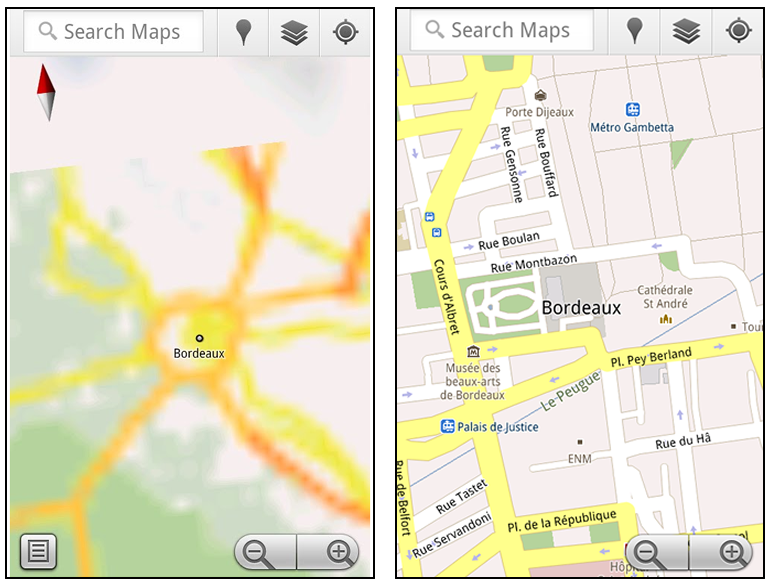
Let’s say later you’re visiting Bordeaux during a trip to France. If you were to open Google Maps for mobile and zoom into Bordeaux without data coverage or wifi, you’d see the image on the left:
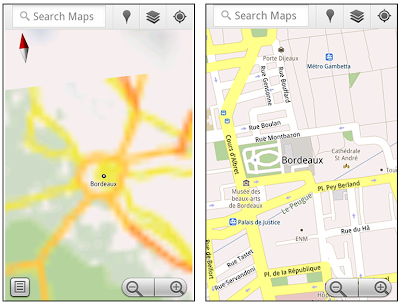
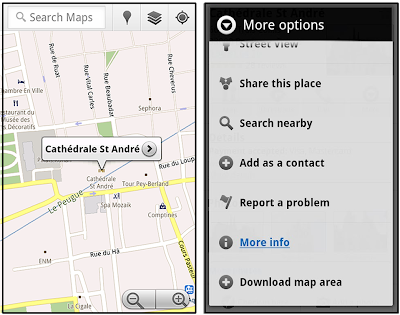
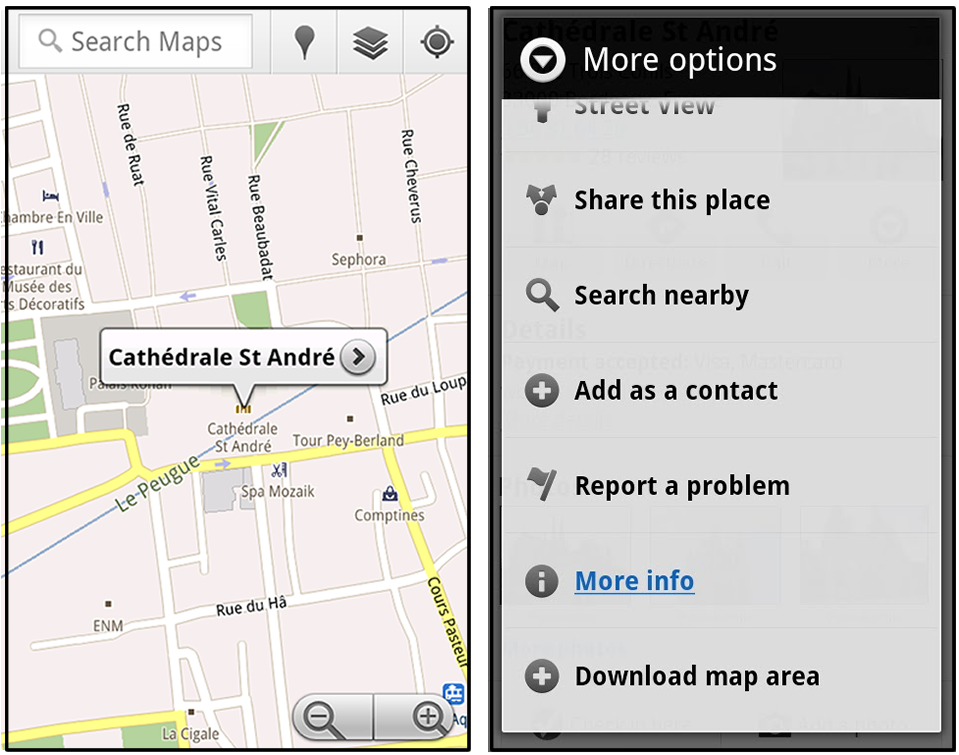
That’s not particularly useful when you’re trying to find out how close you are to the Cathedrale St. Andre. But a little advance planning and “Download map area” can help. Before you take your trip, while you still have access to WiFi or data coverage, you can open up any Places page in the world, click “More” to get the Place page menu, and download Google’s maps for a 10-mile radius.
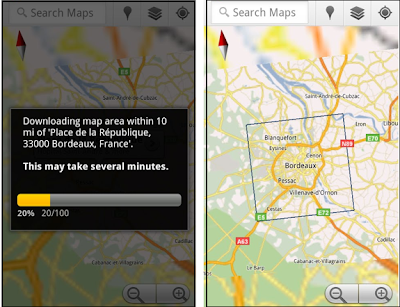
The download can take as little as a minute or two. This download stores only the base map tiles and the landmarks on the map, so you still need a data connection to see satellite view and 3D buildings, search for Places and get directions. But we hope the level of detail available will help you find your way!
All your downloaded map areas can be managed in your Google Maps cache settings so you can delete maps you no longer need or if you want to free up storage. After 30 days, all downloaded map areas will be removed from your cache; they can be re-downloaded any time.
Scale bar
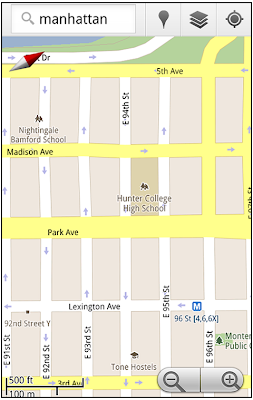
Google Maps has approximately 20 different zoom levels that range from a 2,000 mile scale to a 20 foot scale. With finger gestures making it really quick and easy to zoom in and out, sometimes it’s not always clear what zoom level you’re at. What might be just a few streets away can be quite a long walk depending on the scale. To help with this, you can turn on a scale bar, which updates based on your zoom level.
Measure
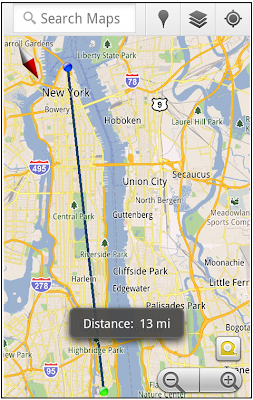
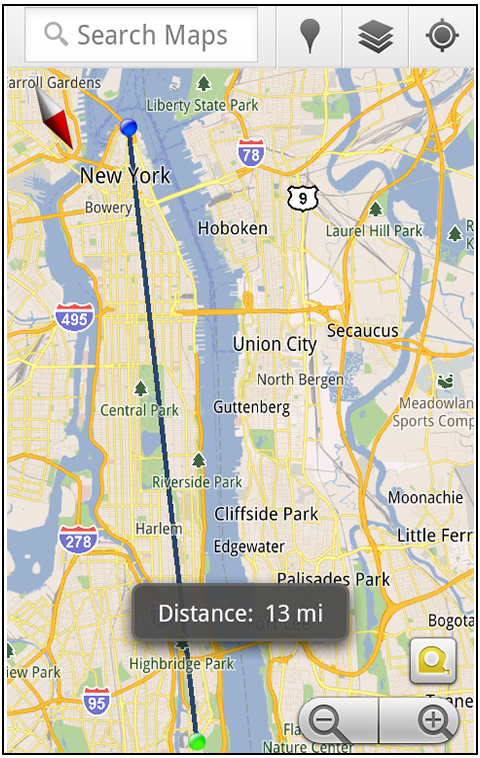
If you ever need to know the distance between San Francisco and New York (about 2602 miles) or between any other two points on the map, the “Measure” lab can help you out. Once it’s enabled, you’ll notice a tape measure icon just above the zoom buttons. After clicking that icon, you’ll be prompted to tap two points on the map and Google Maps will calculate the straight distance between those points (this direct distance is “as the crow flies”).
To access Labs on your phone, press your phone’s menu button once in Google Maps, choose “More” and select Labs. On a tablet, click the menu button in the upper-right corner of Maps. The “Download map area” lab requires Android 2.1+ and the latest version of Google Maps. We look forward to bringing you more experimental features soon and hope you enjoy trying out Labs in Google Maps for Android.
One way we bring you new product features is through Google Labs—a collection of fun, experimental features you can turn on if you’re interested in the functionality. In fact, Google Maps itself started as a lab. In addition to our desktop Maps Labs, Google Maps for Android has a few tricks you can try out right from your phone. We’d like to introduce you to one new experimental feature, “Download map area," but also remind you of two other ones we already have: “Scale bar” and “Measure.”
Download map area
When you’re visiting an unfamiliar location, Google Maps for mobile is great for getting an idea of how close you are to your destination, where streets and landmarks are in relation to each other, or just for getting “un-lost.” But what if you don’t have a data signal, or you’re abroad and don’t have a data plan? We say that if you use Google Maps for mobile, you’ll never need to carry a paper map again. The “Download map area” lab in Google Maps 5.7 for Android is a step in making that statement true even when you’re offline.
Let’s say later you’re visiting Bordeaux during a trip to France. If you were to open Google Maps for mobile and zoom into Bordeaux without data coverage or wifi, you’d see the image on the left:
Left: Bordeaux with no data or wifi. Right: Bordeaux with downloaded map area
That’s not particularly useful when you’re trying to find out how close you are to the Cathedrale St. Andre. But a little advance planning and “Download map area” can help. Before you take your trip, while you still have access to WiFi or data coverage, you can open up any Places page in the world, click “More” to get the Place page menu, and download Google’s maps for a 10-mile radius.
Left: Tap a landmark to enter its Place page. Right: Place page “more options” menu
The download can take as little as a minute or two. This download stores only the base map tiles and the landmarks on the map, so you still need a data connection to see satellite view and 3D buildings, search for Places and get directions. But we hope the level of detail available will help you find your way!

Left: Status screen for download. Right: Coverage of downloaded map area
All your downloaded map areas can be managed in your Google Maps cache settings so you can delete maps you no longer need or if you want to free up storage. After 30 days, all downloaded map areas will be removed from your cache; they can be re-downloaded any time.
Scale bar
Google Maps has approximately 20 different zoom levels that range from a 2,000 mile scale to a 20 foot scale. With finger gestures making it really quick and easy to zoom in and out, sometimes it’s not always clear what zoom level you’re at. What might be just a few streets away can be quite a long walk depending on the scale. To help with this, you can turn on a scale bar, which updates based on your zoom level.

Scale bar in the lower left
Measure
If you ever need to know the distance between San Francisco and New York (about 2602 miles) or between any other two points on the map, the “Measure” lab can help you out. Once it’s enabled, you’ll notice a tape measure icon just above the zoom buttons. After clicking that icon, you’ll be prompted to tap two points on the map and Google Maps will calculate the straight distance between those points (this direct distance is “as the crow flies”).
Example of the “Measure” Labs feature
To access Labs on your phone, press your phone’s menu button once in Google Maps, choose “More” and select Labs. On a tablet, click the menu button in the upper-right corner of Maps. The “Download map area” lab requires Android 2.1+ and the latest version of Google Maps. We look forward to bringing you more experimental features soon and hope you enjoy trying out Labs in Google Maps for Android.
Rabu, 06 Juli 2011
Google Maps 5.7 for Android introduces Transit Navigation (Beta) and more
(Cross-posted on the Google Lat Long Blog and the Google Mobile Blog)
Today we’re releasing Google Maps 5.7 for Android. From Bangkok to Baltimore, we’ve added Transit Navigation (Beta), updated access to directions, better suggested search results and a photo viewer to Place pages—all of which can help you whether you’re traveling to an unfamiliar part of town or visiting a city across the world.
Transit Navigation (Beta)
Google Maps Navigation (Beta) currently provides over 12 billion miles of GPS-guided driving and walking directions per year. Now, GPS turn-by-turn (or in this case, stop-by-stop) navigation is available for public transit directions in 400+ cities around the globe with Transit Navigation.
Transit Navigation uses GPS to determine your current location along your route and alerts you when it’s time to get off or make a transfer. This is particularly helpful if you’re in a city where you don’t speak the language and can’t read the route maps or understand the announcements. After starting your trip with Transit Navigation, you can open another application or put your phone away entirely and Google Maps will still display an alert in your notification bar and vibrate your phone when your stop is coming up.
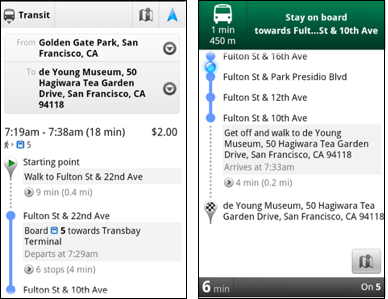
Left: Transit directions without Navigation. Right: with Navigation
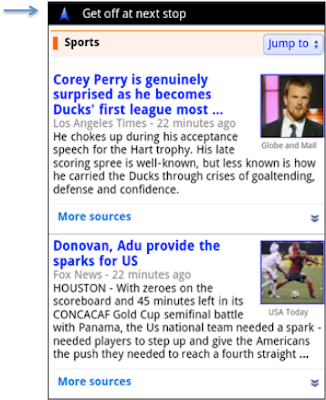
Navigation alerts appear even if you switch to another app
Now you can spend more time enjoying the sights out the window and less time worrying about how many stops are left, where you are along the route or whether you missed your stop. Since Transit Navigation relies on GPS signals, we recommend using this feature for above-ground transit.
Updated Directions
Now that we’ve improved our directions services, we wanted them to be incredibly easy to pull up on your screen. If you select the driving or walking icon and your route is supported by Google Maps Navigation, the Navigation icon will automatically appear so you can get access to step-by-step directions in one click. Note: this change is currently only in place for driving and walking and does not appear for public transit.
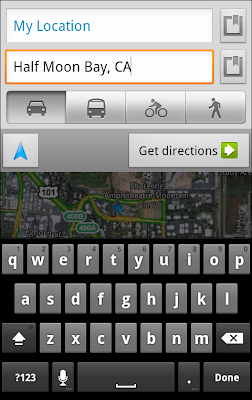
One-click access to Navigation from directions
We’ve also streamlined how you access directions from within a Place page. Before, clicking directions in a Place page would bring up options for “Driving Navigation,” “Walking Navigation” and “Directions.” Now, you’ll be taken straight to the map and see the new directions box shown above.
Improved Search Suggest
We’ve made two changes to search suggestions that improve their quality and speed. First, we’ve added category icons, so instead of all search suggestions displaying the same icon, the icon next to the listing will reflect the type of result. You’ll see a pin for a Google Places listing, a star for a starred Place or location, a clock for a previously used search term, a person for contacts and a magnifying glass for “anything else.”
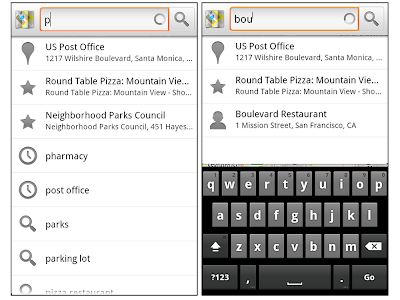
Two examples of search suggest with new icons
Also, any place you got directions to or called directly from its Places page will be included as a suggestion for a relevant search. For example, if you recently received directions to the U.S. Post Office on Wilshire Boulevard, afterward, when you begin a search with [p] or [bou], that U.S. Post Office would appear as a search suggestion.
Photo viewer for Place pages
Since we released business photos for Place pages last October, millions of photos have been added to Place pages around the world. To enable you to view these photos on the run, a slick new photo viewer has been added so you can browse photos while deciding where to go.

Left: Business photos in Place pages. Right: New photo viewer
To start using Google Maps 5.7 for Android, download the update here. This update requires an Android OS 2.1+ device and works anywhere Google Maps is currently available. Learn more at our help center and have fun exploring, whether it be by car, transit, bike or foot.
Today we’re releasing Google Maps 5.7 for Android. From Bangkok to Baltimore, we’ve added Transit Navigation (Beta), updated access to directions, better suggested search results and a photo viewer to Place pages—all of which can help you whether you’re traveling to an unfamiliar part of town or visiting a city across the world.
Transit Navigation (Beta)
Google Maps Navigation (Beta) currently provides over 12 billion miles of GPS-guided driving and walking directions per year. Now, GPS turn-by-turn (or in this case, stop-by-stop) navigation is available for public transit directions in 400+ cities around the globe with Transit Navigation.
Transit Navigation uses GPS to determine your current location along your route and alerts you when it’s time to get off or make a transfer. This is particularly helpful if you’re in a city where you don’t speak the language and can’t read the route maps or understand the announcements. After starting your trip with Transit Navigation, you can open another application or put your phone away entirely and Google Maps will still display an alert in your notification bar and vibrate your phone when your stop is coming up.
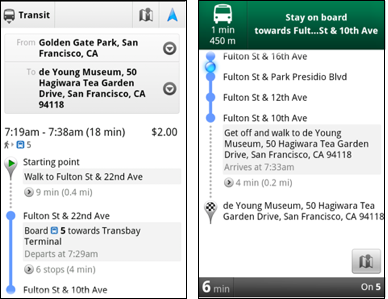

Now you can spend more time enjoying the sights out the window and less time worrying about how many stops are left, where you are along the route or whether you missed your stop. Since Transit Navigation relies on GPS signals, we recommend using this feature for above-ground transit.
Updated Directions
Now that we’ve improved our directions services, we wanted them to be incredibly easy to pull up on your screen. If you select the driving or walking icon and your route is supported by Google Maps Navigation, the Navigation icon will automatically appear so you can get access to step-by-step directions in one click. Note: this change is currently only in place for driving and walking and does not appear for public transit.

We’ve also streamlined how you access directions from within a Place page. Before, clicking directions in a Place page would bring up options for “Driving Navigation,” “Walking Navigation” and “Directions.” Now, you’ll be taken straight to the map and see the new directions box shown above.
Improved Search Suggest
We’ve made two changes to search suggestions that improve their quality and speed. First, we’ve added category icons, so instead of all search suggestions displaying the same icon, the icon next to the listing will reflect the type of result. You’ll see a pin for a Google Places listing, a star for a starred Place or location, a clock for a previously used search term, a person for contacts and a magnifying glass for “anything else.”

Also, any place you got directions to or called directly from its Places page will be included as a suggestion for a relevant search. For example, if you recently received directions to the U.S. Post Office on Wilshire Boulevard, afterward, when you begin a search with [p] or [bou], that U.S. Post Office would appear as a search suggestion.
Photo viewer for Place pages
Since we released business photos for Place pages last October, millions of photos have been added to Place pages around the world. To enable you to view these photos on the run, a slick new photo viewer has been added so you can browse photos while deciding where to go.

To start using Google Maps 5.7 for Android, download the update here. This update requires an Android OS 2.1+ device and works anywhere Google Maps is currently available. Learn more at our help center and have fun exploring, whether it be by car, transit, bike or foot.
Senin, 27 Juni 2011
The J. Paul Getty Museum collection comes alive with Google Goggles
The Google Goggles team has worked with The J. Paul Getty Museum in Los Angeles to “Goggles-enable” their permanent collection of paintings. Now you can use the Google Goggles app on your phone to take a photo of any of the paintings in the Getty’s permanent collection and instantly access information about the work from both the Getty’s mobile-optimized webpage about the painting and from around the web. Instead of being limited to the amount of information that fits on the wall next to a painting, Getty museum staff can now share a fuller story that all visitors can enjoy online.
From your phone you can read and hear commentary from artists, curators, conservators or the works of art themselves, such as the anthropomorphic voice of the pig in the Adoration of the Magi. Snap a quick shot of the artwork and have an interactive experience with what is on the wall in front of you—all in in the palm of your hand (just remember to respect museum photography rules and to turn off your flash).


If you want to take your art history lesson home with you, you can store a record of the art you captured by enabling Search History on your Android phone. In fact, anytime you stumble across a piece of art, whether it be a reproduction on a poster or a print in a book, you can take a photo with your phone and Goggles will recognize it and supply you with rich info.
Download Google Goggles for your Android or iOS device as part of the Google Search app, and give it a try if you stop by the Getty. You can also view the J. Paul Getty Museum collection online at http://www.getty.edu/art. For more information about the Getty-Goggles project, visit mobile.getty.edu/gettygoggles or scan the QR code below.

Posted by Shailesh Nalawadi, Product Manager
From your phone you can read and hear commentary from artists, curators, conservators or the works of art themselves, such as the anthropomorphic voice of the pig in the Adoration of the Magi. Snap a quick shot of the artwork and have an interactive experience with what is on the wall in front of you—all in in the palm of your hand (just remember to respect museum photography rules and to turn off your flash).


Google Goggles results and the Getty webpage for Portrait of the Sisters Bonaparte
If you want to take your art history lesson home with you, you can store a record of the art you captured by enabling Search History on your Android phone. In fact, anytime you stumble across a piece of art, whether it be a reproduction on a poster or a print in a book, you can take a photo with your phone and Goggles will recognize it and supply you with rich info.
Download Google Goggles for your Android or iOS device as part of the Google Search app, and give it a try if you stop by the Getty. You can also view the J. Paul Getty Museum collection online at http://www.getty.edu/art. For more information about the Getty-Goggles project, visit mobile.getty.edu/gettygoggles or scan the QR code below.

Posted by Shailesh Nalawadi, Product Manager
Rabu, 08 Juni 2011
Know when your bus is late with live transit updates in Google Maps
(Cross-posted on the Lat Long Blog and Mobile Blog)
Often when I’m taking public transit, I arrive at my stop on time only to anxiously check my watch and look down the street for my bus, which is running late once again. Those extra minutes I’m forced to wait seem like an eternity, and the only information I can access on my phone is when the bus was supposed to arrive.
Starting now, Google Maps for mobile and desktop can tell you when your ride is actually going to arrive with new live transit updates. We partnered with transit agencies to integrate live transit data in four U.S. cities and two European cities: Boston, Portland, Ore., San Diego, San Francisco, Madrid and Turin.
When you click on a transit station or plan a transit route with Google Maps and there are delays or alerts related to your trip, you’ll now see “live departure times” (indicated with a special icon) and service alerts.


We’re working with our public transit partners to help them provide live data to more people in more cities. You can get live transit updates in the latest version of Google Maps for mobile (requires Android 1.6+), as well as Google Maps on all supported desktop and mobile browsers.
Often when I’m taking public transit, I arrive at my stop on time only to anxiously check my watch and look down the street for my bus, which is running late once again. Those extra minutes I’m forced to wait seem like an eternity, and the only information I can access on my phone is when the bus was supposed to arrive.
Starting now, Google Maps for mobile and desktop can tell you when your ride is actually going to arrive with new live transit updates. We partnered with transit agencies to integrate live transit data in four U.S. cities and two European cities: Boston, Portland, Ore., San Diego, San Francisco, Madrid and Turin.
When you click on a transit station or plan a transit route with Google Maps and there are delays or alerts related to your trip, you’ll now see “live departure times” (indicated with a special icon) and service alerts.

Live transit departure times after tapping on a station

Live service alerts when receiving transit directions

Live departures and alerts on desktop
We’re working with our public transit partners to help them provide live data to more people in more cities. You can get live transit updates in the latest version of Google Maps for mobile (requires Android 1.6+), as well as Google Maps on all supported desktop and mobile browsers.
Kamis, 26 Mei 2011
Coming soon: make your phone your wallet
(Cross-posted on the Google Commerce Blog and Google Mobile Blog)

Today in our New York City office, along with Citi, MasterCard, First Data and Sprint, we gave a demo of Google Wallet, an app that will make your phone your wallet. You’ll be able to tap, pay and save using your phone and near field communication (NFC). We’re field testing Google Wallet now and plan to release it soon.
Google Wallet is a key part of our ongoing effort to improve shopping for both businesses and consumers. It’s aimed at making it easier for you to pay for and save on the goods you want, while giving merchants more ways to offer coupons and loyalty programs to customers, as well as bridging the gap between online and offline commerce.
Because Google Wallet is a mobile app, it will do more than a regular wallet ever could. You'll be able to store your credit cards, offers, loyalty cards and gift cards, but without the bulk. When you tap to pay, your phone will also automatically redeem offers and earn loyalty points for you. Someday, even things like boarding passes, tickets, ID and keys could be stored in Google Wallet.

At first, Google Wallet will support both Citi MasterCard and a Google Prepaid Card, which you’ll be able to fund with almost any payment card. From the outset, you’ll be able to tap your phone to pay wherever MasterCard PayPass is accepted. Google Wallet will also sync your Google Offers, which you’ll be able to redeem via NFC at participating SingleTap™ merchants, or by showing the barcode as you check out. Many merchants are working to integrate their offers and loyalty programs with Google Wallet.
With Google Wallet, we’re building an open commerce ecosystem, and we’re planning to develop APIs that will enable integration with numerous partners. In the beginning, Google Wallet will be compatible with Nexus S 4G by Google, available on Sprint. Over time, we plan on expanding support to more phones.
To learn more please visit our Google Wallet website at www.google.com/wallet.
This is just the start of what has already been a great adventure towards the future of mobile shopping. We’re incredibly excited and hope you are, too.

Today in our New York City office, along with Citi, MasterCard, First Data and Sprint, we gave a demo of Google Wallet, an app that will make your phone your wallet. You’ll be able to tap, pay and save using your phone and near field communication (NFC). We’re field testing Google Wallet now and plan to release it soon.
Google Wallet is a key part of our ongoing effort to improve shopping for both businesses and consumers. It’s aimed at making it easier for you to pay for and save on the goods you want, while giving merchants more ways to offer coupons and loyalty programs to customers, as well as bridging the gap between online and offline commerce.
Because Google Wallet is a mobile app, it will do more than a regular wallet ever could. You'll be able to store your credit cards, offers, loyalty cards and gift cards, but without the bulk. When you tap to pay, your phone will also automatically redeem offers and earn loyalty points for you. Someday, even things like boarding passes, tickets, ID and keys could be stored in Google Wallet.

At first, Google Wallet will support both Citi MasterCard and a Google Prepaid Card, which you’ll be able to fund with almost any payment card. From the outset, you’ll be able to tap your phone to pay wherever MasterCard PayPass is accepted. Google Wallet will also sync your Google Offers, which you’ll be able to redeem via NFC at participating SingleTap™ merchants, or by showing the barcode as you check out. Many merchants are working to integrate their offers and loyalty programs with Google Wallet.
With Google Wallet, we’re building an open commerce ecosystem, and we’re planning to develop APIs that will enable integration with numerous partners. In the beginning, Google Wallet will be compatible with Nexus S 4G by Google, available on Sprint. Over time, we plan on expanding support to more phones.
To learn more please visit our Google Wallet website at www.google.com/wallet.
This is just the start of what has already been a great adventure towards the future of mobile shopping. We’re incredibly excited and hope you are, too.
Rabu, 25 Mei 2011
AdMob celebrates one year at Google as mobile growth accelerates
As we approach the first anniversary of AdMob’s arrival at Google this Friday, it’s amazing to look at how much the mobile industry has grown since last year: an estimated 300 million smartphones were shipped, average smartphone data-usage doubled and hundreds of thousands of new mobile apps have been created.
Many thousands of mobile publishers and developers use ads to support their businesses, so we’re excited to see rapid growth in mobile advertising, too. For example, in the last year, traffic on the AdMob network has grown more than three and a half times, and we now get more than 2.7 billion ad requests every day. We have thousands of advertisers both large and small getting great results every day on AdMob’s network of more than 80,000 mobile apps and sites. To celebrate AdMob’s first year at Google, today we’re introducing a set of new products and features for mobile advertisers and publishers.
New ad formats for tablets
In the last six months alone, traffic from tablets on the AdMob network has increased by 300 percent. To help advertisers better connect with tablet users, today we’re launching a variety of new, tablet-specific rich media ad formats. These new HTML5-based ad formats are built specifically for tablets’ larger, high-definition screens, and make use of features like touch, tap and swipe. Together, these features will enable advertisers to develop rich, engaging campaigns and run them across multiple mobile platforms.
Enhanced tools for mobile app developers
To help app developers grow their app businesses, we’re releasing a significant upgrade to our AdMob “House Ads” product, which developers can use to promote their own products within their mobile apps. The new version includes improved campaign management, new ad formats and better ad targeting options.
In the coming months, we’ll also improve mobile app developers’ ability to use AdMob to deliver the most valuable ad by integrating a new “mediation” feature that selects the best ad from multiple, competing ad networks directly into the Google AdMob Ads SDK.
Deeper integration with Google advertising products
Many advertisers, agencies and publishers use DoubleClick’s ad serving and measurement tools to manage their digital ad campaigns. We envision a single platform that enables seamless management of ads across desktop, video, mobile and tablets. Our announcement earlier this week about the availability of DoubleClick Rich Media ads on the AdMob Network on the AdMob network is one example of this commitment. In a few weeks, we’ll also add support for mobile to our DoubleClick for Publishers (DFP) Small Business ad serving product, which thousands of web publishers use today to manage ads that appear on their sites.
The last year has seen incredible growth, but it’s just the beginning. We believe that the products we’re announcing today will further accelerate the growth of mobile advertising, enable marketers and developers to rapidly grow their businesses and help to fund more great mobile content and apps for users.
Many thousands of mobile publishers and developers use ads to support their businesses, so we’re excited to see rapid growth in mobile advertising, too. For example, in the last year, traffic on the AdMob network has grown more than three and a half times, and we now get more than 2.7 billion ad requests every day. We have thousands of advertisers both large and small getting great results every day on AdMob’s network of more than 80,000 mobile apps and sites. To celebrate AdMob’s first year at Google, today we’re introducing a set of new products and features for mobile advertisers and publishers.
New ad formats for tablets
In the last six months alone, traffic from tablets on the AdMob network has increased by 300 percent. To help advertisers better connect with tablet users, today we’re launching a variety of new, tablet-specific rich media ad formats. These new HTML5-based ad formats are built specifically for tablets’ larger, high-definition screens, and make use of features like touch, tap and swipe. Together, these features will enable advertisers to develop rich, engaging campaigns and run them across multiple mobile platforms.
Enhanced tools for mobile app developers
To help app developers grow their app businesses, we’re releasing a significant upgrade to our AdMob “House Ads” product, which developers can use to promote their own products within their mobile apps. The new version includes improved campaign management, new ad formats and better ad targeting options.
In the coming months, we’ll also improve mobile app developers’ ability to use AdMob to deliver the most valuable ad by integrating a new “mediation” feature that selects the best ad from multiple, competing ad networks directly into the Google AdMob Ads SDK.
Deeper integration with Google advertising products
Many advertisers, agencies and publishers use DoubleClick’s ad serving and measurement tools to manage their digital ad campaigns. We envision a single platform that enables seamless management of ads across desktop, video, mobile and tablets. Our announcement earlier this week about the availability of DoubleClick Rich Media ads on the AdMob Network on the AdMob network is one example of this commitment. In a few weeks, we’ll also add support for mobile to our DoubleClick for Publishers (DFP) Small Business ad serving product, which thousands of web publishers use today to manage ads that appear on their sites.
The last year has seen incredible growth, but it’s just the beginning. We believe that the products we’re announcing today will further accelerate the growth of mobile advertising, enable marketers and developers to rapidly grow their businesses and help to fund more great mobile content and apps for users.
Langganan:
Postingan (Atom)